Maximo Open Forum

 View Only
  • 1.  COMBOBOX(drop down menu)

    Posted 10-22-2021 07:56
    Hello all,

    We are using Maximo version 7.6.0.10. I have problem with COMBOBOX element in Maximo. Is possible to have TABLEDOMAIN at COMBOBOX?

    COMBOBOX:
    This is how this must works --> 
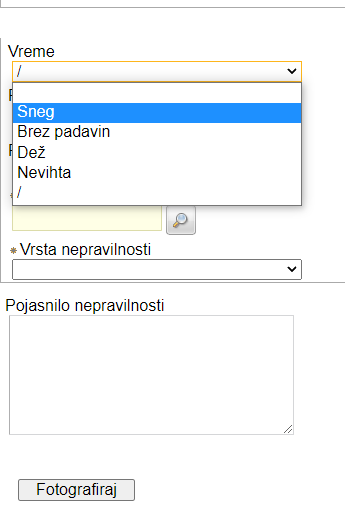


    But If I add TABLEDOMAIN at attribute my COMBOBOX wont open anything
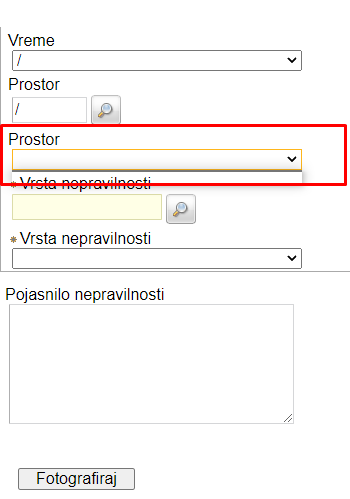


    Any idea how to solve this?

    Table domain properly works at TEXTFIELD with lookup :)

    Best regards

    #Customizations
    #MaximoApplicationSuite

    ------------------------------
    Blaz Rakar
    Slovenske Zeleznice d.o.o.
    ------------------------------


  • 2.  RE: COMBOBOX(drop down menu)

    Posted 10-24-2021 20:10
    Combo boxes are cached on page load which I think is probably causing your issue. I'm assuming in the list where on the table domain you're depending on some other attribute that isn't set when the page is loaded. Lookups load when you open the dialog so they're constantly able to refresh based on the data entered.

    I'm not aware of a way to force the combo box to refresh, though I would think it's possible. You'd probably have to get in the weeds of the combo box logic so you'd have to be comfortable reviewing the Maximo code.

    ------------------------------
    Steven Shull
    IBM
    ------------------------------


Newest Episode
Ep. 10 | How Naviam DataStudio Makes Data Imports Easier with Lee Daley

Steven Shull and Lee Daley explore how Naviam DataStudio helps IBM Maximo teams simplify bulk data imports, validate information before loading, and improve data quality and management.

MORE by Naviam Episode 10: How Naviam DataStudio Makes Data Imports Easier with Lee Daley
Watch Episode 10
Also available: Ep. 9 | Best Maximo Resources to Stay Informed