Hi Niv,
Thank you for your reply!
I know how to add an option to the toolbar, my question was how to add the toolbar itself to the application. :)
I'm interested especially to have the Quick Search menu (the one behind the three dots icon).
Thank you,
Dragos
------------------------------
Dragos Chitu
EL
------------------------------
Original Message:
Sent: 11-22-2024 08:11
From: Niv Geo
Subject: Add toolbar menu to application
Go to the Application in Application Designer, and choose Add/Modify toolbar Menu option from More Actions
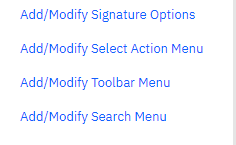
Add the SIGOPTION that you need displayed on the Toolbar.
You may want to add the option in the System Property: mxe.webclient.showOnToolbar, in case you do not see the option that you just added.

------------------------------
Niv Geo
Original Message:
Sent: 11-22-2024 03:45
From: Dragos Chitu
Subject: Add toolbar menu to application
Hi,
Could you please let me know how can I add a toolbar menu to an application in MAS 8/9?
Something like in the print screen below.

Thank you,
Dragos
#Administration
#Assets
#Customizations
#EndUser
#EverythingMaximo
#Integrations
#Inventory
#LifeScience/Calibration
#MaximoApplicationSuite
#MaximoUserGroups
#Mobility
#Security
------------------------------
Dragos Chitu
EL
------------------------------