another option is to use the "Generate Request pages" button directly from list of reports. You can use filter to specify which report(s) you need to "generate" and then run the action.
Original Message:
Sent: 08-21-2024 03:28
From: Matis Dovydas
Subject: Issues with Generating Report Previews in IBM Maximo
I want to give a big thanks to Christopher Winston for pointing me in the right direction regarding the missing "Generate Request Page" button. After his suggestion, I did some searching and came across this article: Generate Request Page button missing on the Report tab in Maximo® v7.6.0.
It turns out that this button can be hidden due to multi-language settings, which I hadn't considered. After making the necessary moves, found the button, and everything is working as expected now.
It's amazing how something small and seemingly trivial can be easily overlooked, especially when you're in a rush. This issue took me almost two full working days to figure out, huhh.
Have a nice day!
------------------------------
Matis Dovydas
Original Message:
Sent: 08-20-2024 09:17
From: Matis Dovydas
Subject: Issues with Generating Report Previews in IBM Maximo
Thank you for the information.
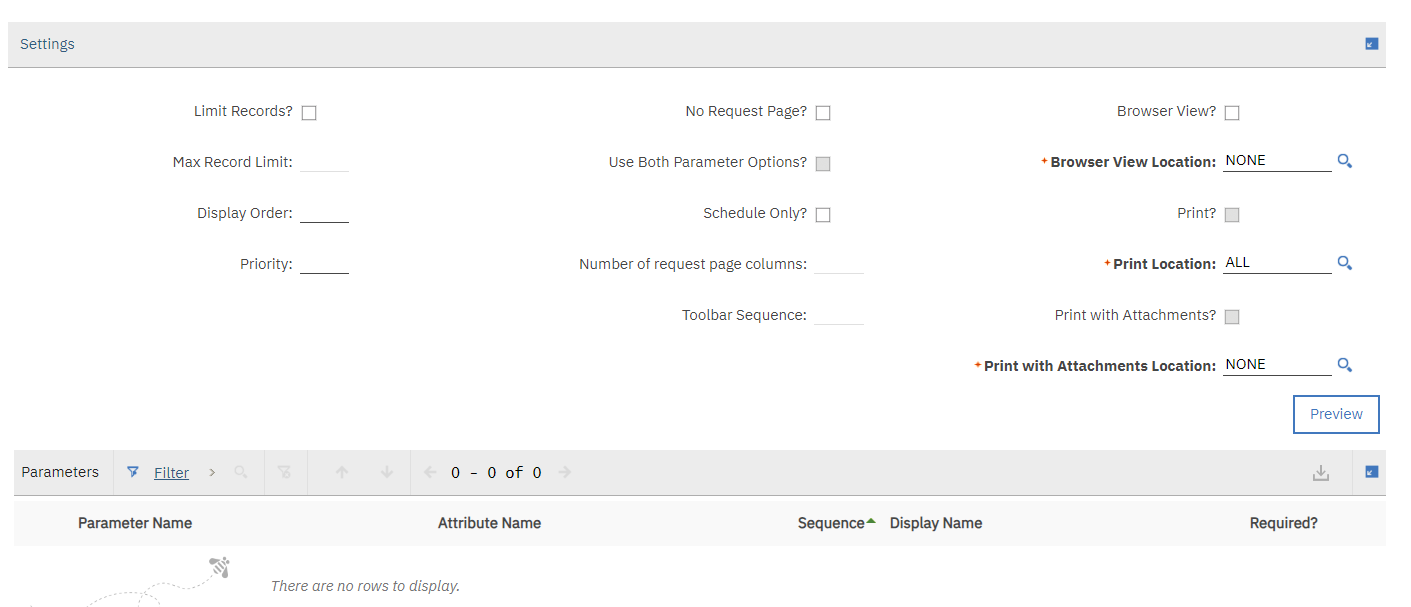
I did import the report into a newly created "Report Administration" in Maximo, but the "Generate Request Page" button didn't show up. I only have a "Preview" button available.
Here's what I did in BIRT:
- Made a connection to the database.
- Created a dataset based on a simple SQL query pulling data from the
ASSET table. - Dragged and dropped the fields (
assetnum, location, parent, and description) into a table within the report layout.
After these steps, I imported the report into Maximo but didn't see the option to generate the request page. Is there something I might be missing in the report creation or import process that could cause this?
Appreciate any further guidance!
------------------------------
Matis Dovydas
Original Message:
Sent: 08-20-2024 08:55
From: Christopher Winston
Subject: Issues with Generating Report Previews in IBM Maximo
BIRT for 7.6.1.3 is 4.8 as outlined here: https://www.ibm.com/docs/en/mam/7.6.1.x?topic=7613-whats-new-in
Did you go into Report Administration and 'Generate Request Page'?

------------------------------
Christopher Winston
Projetech Inc.
IBM Champion 2024
Original Message:
Sent: 08-20-2024 08:05
From: Matis Dovydas
Subject: Issues with Generating Report Previews in IBM Maximo
Hello Maximo Community,
I'm encountering an issue in IBM Maximo when trying to generate a preview for a simple report, and I'm hoping for some guidance.
Issue: When I attempt to preview a basic BIRT report in Maximo, I receive the following error: BMXAA3555E - The report is not available because its request page has not been generated.
Report Details: The report is as simple as possible, drawing data from the ASSET table, specifically the assetnum, location, parent, and description fields. There are no parameters or complex logic involved - it's just a straightforward select of a few fields from the table.
I ensured the report design is as basic as possible, to rule out any complex logic causing the problem.
Error Specifics: The BMXAA3555E error message isn't providing detailed insights into what's going wrong. From what I understand, this error is fairly generic and can be related to various issues ranging from configuration settings to underlying database problems.
Has anyone encountered the BMXAA3555E error specifically when generating simple BIRT report previews in Maximo?
Could this issue be related to the BIRT version compatibility with Maximo, and if so, what is the recommended version of BIRT for Maximo 7.6.1.3? Tried 4.3.1, 4.8.0 and 4.16 - without success
I appreciate any advice or insights you might have to help resolve this issue. My goal is to get this basic report working before moving on to more complex reporting needs.
Thank you!
#Reporting
------------------------------
Matis Dovydas
------------------------------