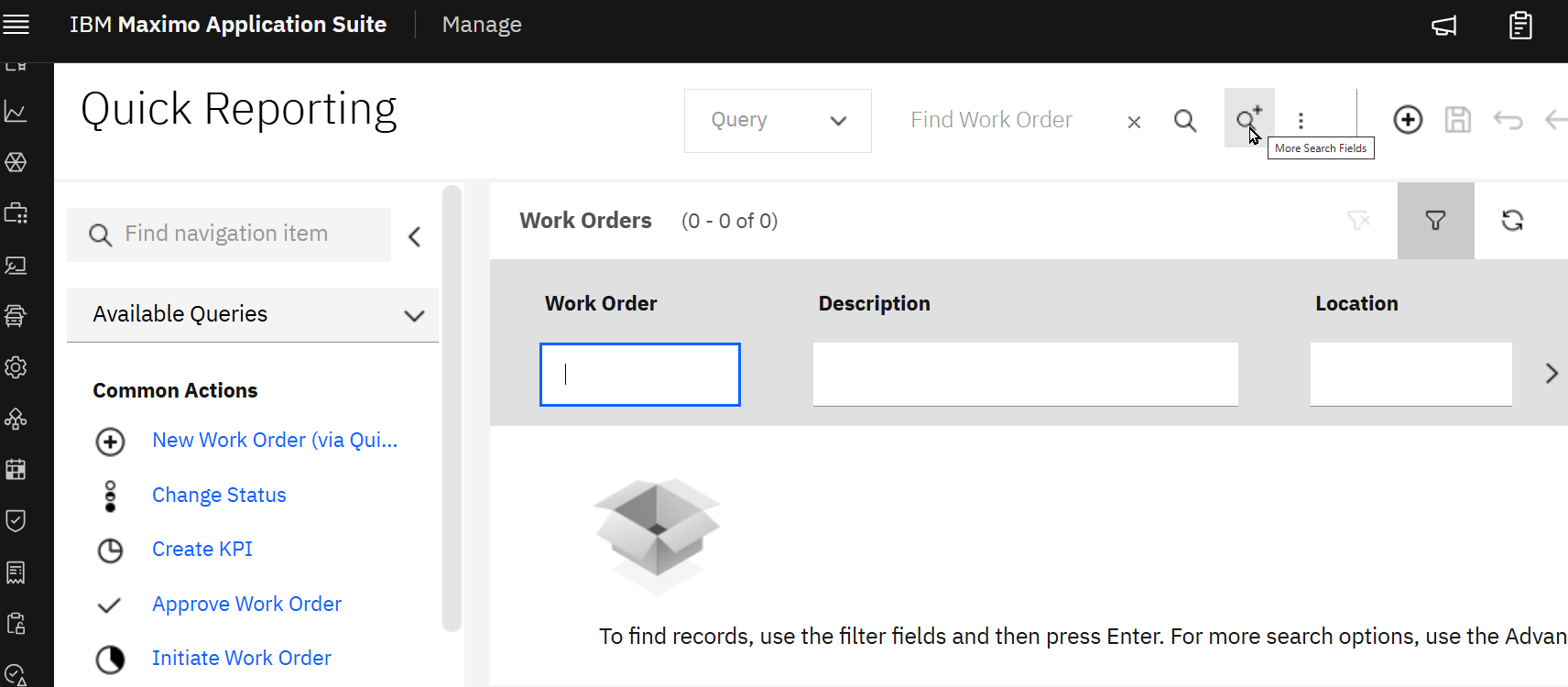
Just so you know, the 'More Search Fields' button is back on the list tab in the applications for 9.1. It just moved a little and some might say it is hidden in plain sight.
------------------------------
Christopher Winston
Naviam
IBM Champion 2024 and 2025
------------------------------
Original Message:
Sent: 07-29-2025 11:37
From: Simon Barnes
Subject: Location of text on List View
awesome thanks!
------------------------------
Simon Barnes
Naviam
Original Message:
Sent: 07-28-2025 22:55
From: Steven Shull
Subject: Location of text on List View
This is the Maximo message
group: tableinfo
key: listTableStartEmptyMsg
You can modify this in Database Configuration to change the text.
------------------------------
Steven Shull
Naviam
Original Message:
Sent: 07-28-2025 18:07
From: Simon Barnes
Subject: Location of text on List View
When the list view is blank - there is text displayed
To find records, use the filter fields and then press Enter. For more search options, use the Advanced Search button. To enter a new record, select the Insert icon in the toolbar.
Given that MAS no longer has an "Advanced Search button" and a only More Search option
Does anyone know where this text is located so we might change it?
#MaximoApplicationSuite
------------------------------
Simon Barnes
Naviam
------------------------------