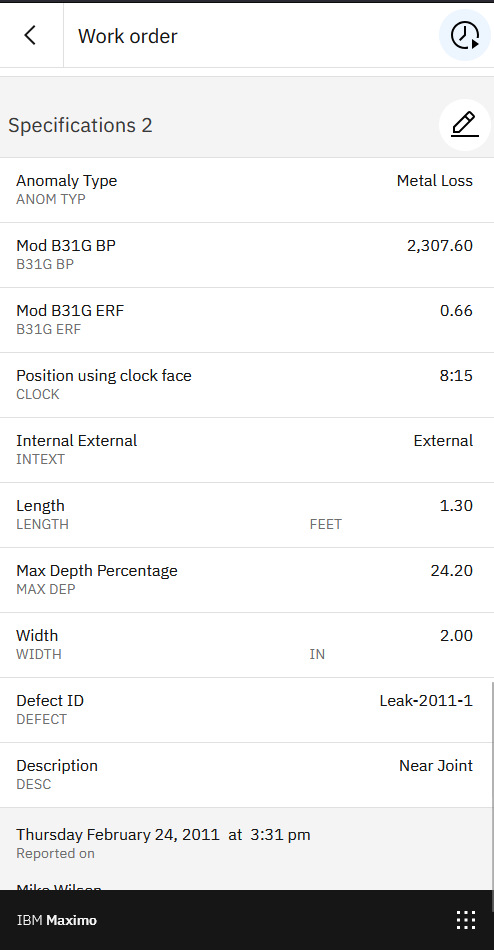
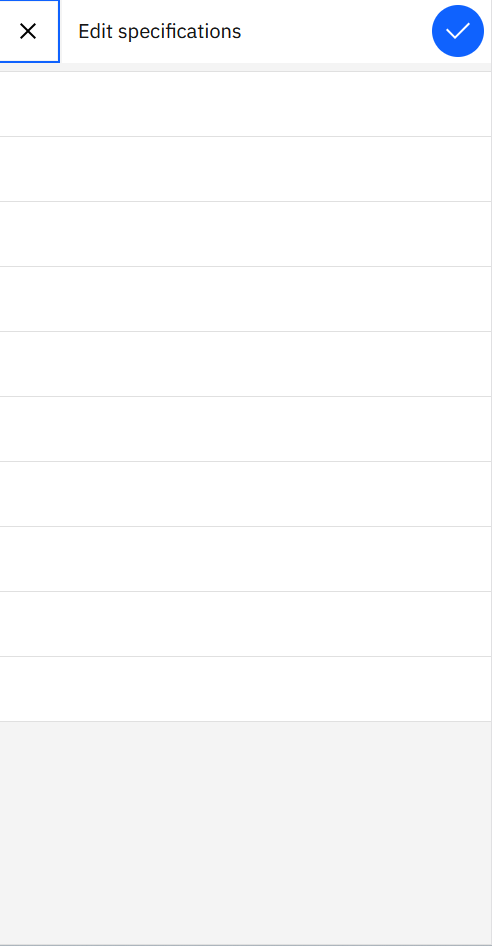
I need to make WORKORDERSPEC data editable in the Maximo Technician Mobile application. I've created a custom data source and implemented a sliding drawer UI, similar to the one used for assets. While the sliding drawer shows the correct number of rows, the fields are blank.
My main question is how to correctly configure the WORKORDERSPEC table to be editable in the Technician application, specifically how to display and save the data within the sliding drawer.
Following are the changes I've done so far.
Data source:
---------------
<maximo-datasource id="woSpecResource" object-structure="MXAPIWO3" where="wonum="{page.params.wonum}" and siteid="{page.params.siteid}"">
<schema id="">
<attribute id="" name="wonum" unique-id="true"/>
<attribute id="" name="description"/>
<attribute id="" name="workorderid"/>
<attribute id="" name="siteid"/>
<attribute id="" name="orgid"/>
</schema>
<maximo-datasource depends-on="woSpecResource" id="woSpecResourceDs" id-attribute="workorderspecid" object-name="workorderspec" relationship="workorderspec" selection-mode="none">
<schema id="">
<mobile-child-filter id="" limit="50" order-by="-workorderspecid" related-path="workorder.workorderspecid"/>
<attribute id="" name="workorderspecid" unique-id="true"/>
<attribute id="" name="assetattrid"/>
<attribute id="" name="measureunitid"/>
<attribute id="" name="numvalue" scale="2"/>
<attribute id="" name="alnvalue"/>
<attribute id="" name="datevalue"/>
<attribute id="" name="assetattribute.description--assetattributedesc"/>
<attribute id="" name="displaysequence" sortable="true"/>
</schema>
</maximo-datasource>
</maximo-datasource>
Displaying specification on work order details page:
--------------------------------------------------------------------
<box hidden="{page.state.noDataFoundErrMsg}" padding="{app.state.screen.size === 'sm' || app.state.screen.size === 'md' ? '0' : '.5'}" padding-top="1" id="">
<!--<border-layout hidden="{!woDetailResource.item.assetspeccount}" padding="{app.state.screen.size === 'sm' || app.state.screen.size === 'md' ? '0' : '.5'}" fill-parent="true" id="">-->
<border-layout hidden="{!woSpecResourceDs.items.length === 0}" padding="{app.state.screen.size === 'sm' || app.state.screen.size === 'md' ? '0' : '.5'}" fill-parent="true" id="">
<top vertical-align="center" id="">
<label label="Specifications 2" theme="20-regular" id=""/>
<button icon="carbon:edit" kind="ghost" padding="false" on-click="opencustomSpecificationDrawer2" on-click-arg="" id=""/>
</top>
<start id="" width="100">
<data-list datasource="woSpecResourceDs" show-search="false" id="">
<border-layout padding="false" slot="item" fill-parent="true" id="">
<start width="50" id="" horizontal-overflow="hidden">
<box id="" fill-parent="true" vertical-align="center" fill-child="true">
<field label="{item.assetattributedesc ? item.assetattrid : null}" override-required="true" id="">
<sub-field value="{item.assetattributedesc || item.assetattrid}" id=""/>
</field>
</box>
</start>
<middle width="40" horizontal-align="end" horizontal-overflow="hidden" id="">
<box padding-end="1" fill-parent="true" fill-child="true" id="">
<field value="{item.numvalue || item.alnvalue || item.tablevalue || item.datevalue}" label="{item.measureunitid}" override-required="true" id=""/>
</box>
</middle>
</border-layout>
</data-list>
</start>
</border-layout>
</box>
AppCustomization method to display the Sliding drawer:
-------------------------------------------------------------------------
async opencustomSpecificationDrawer2(evt) {
const woSpecification2 = evt.page.datasources['woSpecResourceDs'];
//await woSpecification.load({ noCache: true});
//await this.checkDataType(event);
evt.page.showDialog("customWOSpecificationDrawer2");
}
Sliding drawer:
----------------------
<sliding-drawer id="customWOSpecificationDrawer2" content-padding="false" align="start" header-text="Edit specifications">
<panel id="">
<data-list datasource="woSpecResourceDs" padding="false" show-search="false" id="">
<border-layout padding="false" slot="item" fill-parent="true" id="">
<start horizontal-overflow="hidden" id="">
<box fill-parent="true" direction="column" hidden="{item.domainid != undefined}" padding-start="1" padding-end="1" fill-child="true" id="">
<smart-input value="{item.alnvalue}" hidden="{item.datatype_maxvalue !== 'ALN'}" input-kind="ALN" label="{item.computedLabel}" hide-step-buttons="true" id=""/>
<smart-input value="{item.numvalue}" hidden="{item.datatype_maxvalue !== 'NUMERIC'}" input-kind="DECIMAL" label="{item.computedLabel}" hide-step-buttons="true" id=""/>
<smart-input value="{item.datevalue}" hidden="{item.datatype_maxvalue !== 'DATE'}" input-kind="DATE" label="{item.computedLabel}" hide-step-buttons="true" id=""/>
</box>
<box fill-parent="true" hidden="{item.domainid == undefined}" padding="0.5" fill-child="true" id="">
<border-layout fill-parent="false" padding="false" middle-border="true" id="">
<start width="90" background-color="ui-01" horizontal-overflow="hidden" id="">
<box children-sizes="100" direction="column" padding-start="0.5" fill-child="true" fill-parent-horizontal="true" id="">
<field label="{item.computedLabel}" label-class-name="header-small" hidden="{item.datatype_maxvalue !== 'ALN'}" swap-position="false" id="">
<sub-field value="{item.alnvalue}" id=""/>
</field>
<field label="{item.assetattrid}" label-class-name="header-small" hidden="{item.datatype_maxvalue !== 'NUMERIC'}" swap-position="false" id="">
<sub-field value="{item.numvalue}" id=""/>
</field>
<field label="{item.assetattrid}" label-class-name="header-small" hidden="{item.datatype_maxvalue !== 'MAXTABLE'}" swap-position="false" id="">
<sub-field value="{item.tablevalue}" id=""/>
</field>
<field label="{item.assetattrid}" label-class-name="header-small" hidden="{item.datatype_maxvalue !== 'DATE'}" swap-position="false" id="">
<sub-field value="{item.datevalue}" id=""/>
</field>
</box>
</start>
<end width="10" background-color="ui-01" id="">
<button icon="carbon:chevron--right" on-click="openSpecLookup" on-click-arg="{{'page':page,'item':item}}" kind="ghost" padding="false" id=""/>
</end>
</border-layout>
</box>
</start>
</border-layout>
</data-list>
</panel>
<button-group slot="header-button" align="end" id="">
<button icon="carbon:checkmark" kind="primary" on-click="saveSpecification" on-click-arg="{{'item':woSpecResourceDs.items,'datasource':woSpecResourceDs}}" id=""/>
</button-group>
</sliding-drawer>
#MaximoApplicationSuite
#Mobility
------------------------------
Suresh Babu
EAM Solutions
------------------------------