Maximo Open Forum

 How to "hotfix" the maxmio.properties File in the Deployed EAR Location

Jump to  Best Answer
  • Administration
Jared Schrag's profile image
Jared Schrag posted 08-22-2024 14:07

I need to perform several rounds of testing with changing a property within the maximo.properties file. To save time, I'd like to "hotfix" the properties.jar file in the deployed EAR location on the WebSphere application server (instead of formally building a new EAR file and deploying it). Below are the steps I am performing; however, whenever the JVM starts back up, I cannot log in and the server logs constantly indicate a NullPointerException when it tries to call MXServer.getProperty(). Are these the correct steps for "hotfixing" the maximo.propeties file within the properties.jar file in the deployed EAR location?

  1. Set current working directory to the deployed EAR location (....\WebSphere\AppServer\profiles\ctgAppSrv01\installedApps\ctgCell01\MAXIMO.ear)
  2. Backup the current properties.jar file (copied to properties_orig.jar)
  3. Using a ZIP utility such as 7-Zip, extract the current maximo.properites file from the properties.jar file
  4. Using a text editor (such as VSCode or notepad), modify the targeted system property value (in my case, I'm trying to augment the list of values in the mxe.crontask.donotrun system property value); save the changes
  5. Overwrite the file within the properties.jar file with the updated maximo.properties file
  6. Restart the JVM(s) on the application server

I will also note that the property mxe.encrypted is set to true and the encryption data is found at the end of the file that I'm modifying in my text editor.

What am I missing or doing incorrectly while attempting to "hotfix" the maximo.properties file with the properties.jar file in the deployed EAR location?

Jared Schrag's profile image
Jared Schrag  Best Answer

I've determined my root cause. Although it is probably not advisable to take the steps I outlined in the original post, I have discovered that if I use Notepad to edit the maximo.properties file, which does contain the encrypted data, saving seems not to corrupt the encrypted bytes portion of the file. My root cause was that I was using VSCode to edit the maximo.properties file, and VSCode was trying to be helpful, but ultimately corrupted the encrypted data portion of the file upon save. I've seen some great responses to my original question and gave me some good insight - thank you so much!

Michael Marsonet's profile image
Michael Marsonet

Jared,

You have the correct steps but I would eliminate backing up the properties.jar unless you are storing it outside of the EAR file. I've done this many times using the steps you have outlined with minor modification. I usually make sure Maximo and the JVM are stopped so there is no lock on teh EAR file then  use 7zip to open the EAR file and use the edit function within 7zip versus extracting the maximo.properties and inserting it back. I also would have multiple maximo.properties files with the different configurations simply rename the one you need within 7zip. Then I always make sure I close 7zip so that the ear file is properly recompiled with the change. 

Hope this helps,

Mike

Jared Schrag's profile image
Jared Schrag

@Michael Marsonet,

Thank you for your quick reply. Are you saying that you modify the actual EAR file, and then redeploy it? I was hoping to simply modify the properties.jar file in the deployed EAR location. I'll try again, ensuring that the application server JVMs are stopped before I proceed with the "hotfix" and see how that works.

Michael Marsonet's profile image
Michael Marsonet

@Jared Schrag, no I don't redeploy. Using 7Zip edit the EAR file WebSphere\AppServer\profiles\ctgAppSrv01\installedApps\ctgCell01\MAXIMO.ear and you should be able to open the properties.jar within 7zip. From here you can right click on maximo.properties to edit it or rename the file as I suggested. I usually just edit the file and comment/unclomment the sections. The key is to close the 7zip so that the EAR archive gets updated. 

You need to make sure you stop the application at a minimum but I like to stop the JVM which is a personal preference when you do these changes. The Maximo.properties is opened on startup only.

Mike

Jared Schrag's profile image
Jared Schrag

@Michael Marsonet,

Thank you for all of your input. Unfortunately, all of my attempts result in the same problem, even after following all of your suggestions. Upon starting up, the Maximo application throws NullPointerExceptions when MXServer.getProperty() is called. Not sure what I can possibly be doing wrong.

Jared Schrag's profile image
Jared Schrag

The only thing I found that worked was to rebuild the EAR file after having made the desired changes in the maximo.properties file, and then extract the properties.jar file from the built EAR file and overwrite that properties.jar file in the deployed EAR location. It's still better than having to remove and redeploy the EAR file, but still seems like I shouldn't have to actaully reabuild any EAR files in order to "hotfix" the maximo.properties file in the properties.jar file in the deployed EAR location.

Alex Walter's profile image
Alex Walter

Jared,

You should be able to recreate the properties.jar file independently of building the entire EAR file. General steps are:

  1. Backup the maximo.properties file.
  2. Remove the mxe.encrypted key and associated encrypted data. Please note that this can be tricky and it may be preferable to start with a clean file.
  3. Make changes to the maximo.properties file.
  4. Run the [maximo home]\tools\maximo\encryptproperties.bat command.
  5. Run the following command to re-create the properties.jar file:
    1. [maximo home]\deployment\buildmaximoearwas8.cmd propertiesBuild
  6. Copy the [maximo home]\deployment\default\temp\properties.jar file to your [websphere home]\AppServer\profiles\ctgAppSrv01\installedApps\ctgCell01\MAXIMO.ear folder.
  7. Restart appropriate JVMs.

Something to note is that you shouldn't backup the properties.jar file in the same location as the original. You can make a backup, but you'll need to move it out of the MAXIMO.ear folder (up higher or out of the tree completely).

Hope this helps,

Alex

Doug Wohlers's profile image
Doug Wohlers

Jared,

   While your JVMs are stopped, make sure to clear your server cache also.

Thanks,

Doug

Michael Krawietz's profile image
Michael Krawietz

Stepping into this late in the game but wanted to add one additional thing to the conversation.

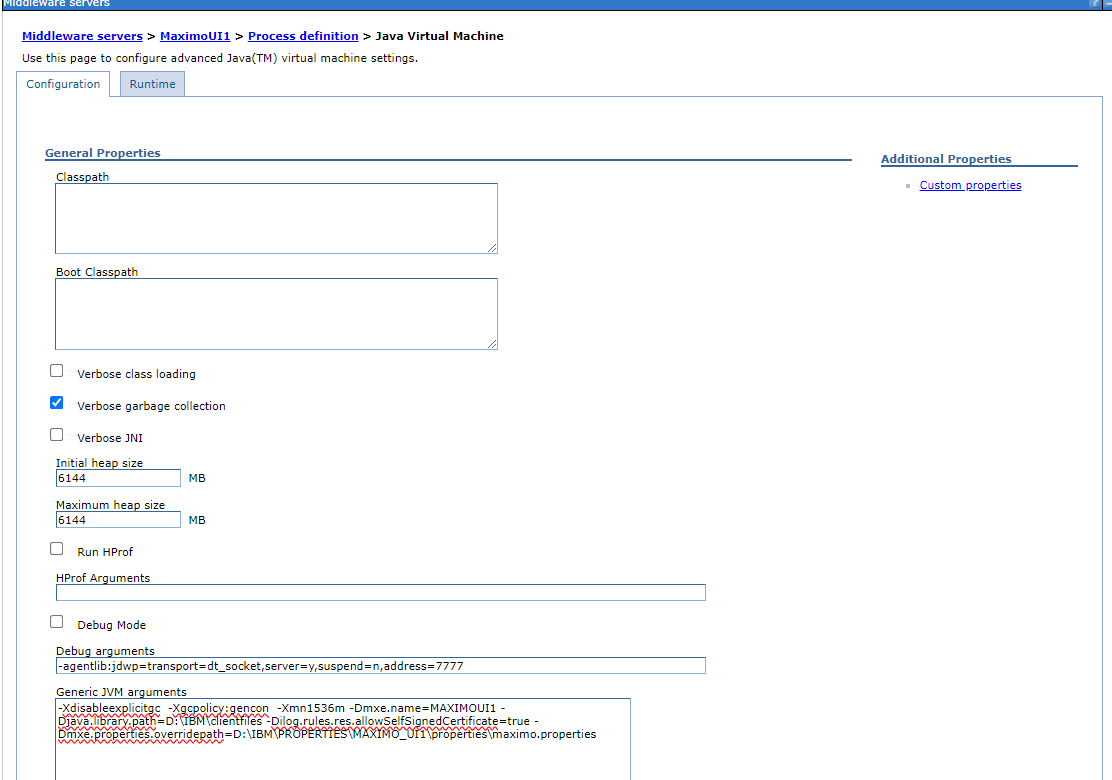
For ease of changing Maximo properties such as connecting to alternative database servers during testing I strongly suggest using a properties override in the Process definition Java Virtual Machine Generic JVM arguments

i.e. -Dmxe.properties.overridepath=D:\IBM\PROPERTIES\MAXIMO_UI1\properties\maximo.properties below. This allows a quick change to the file and a simple restart inside WebSphere.