Hi Sophia,
Steven's observation is accurate that the hierarchypath is a non-persistent Maximo attribute, so the displayed value is not stored as a simple physical database column.
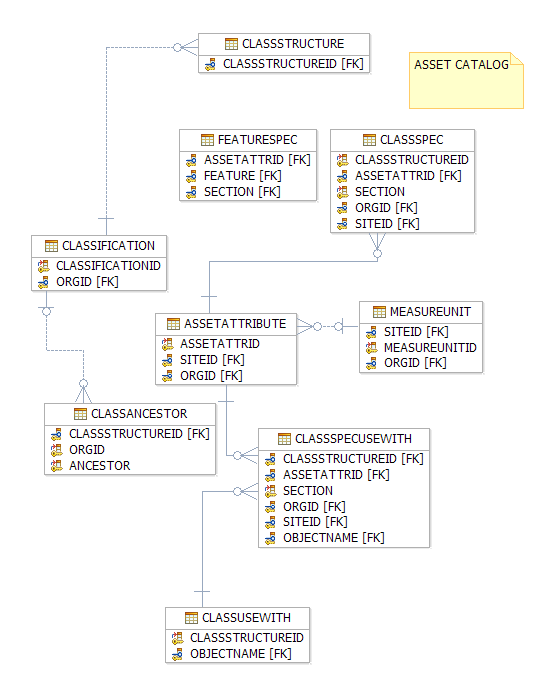
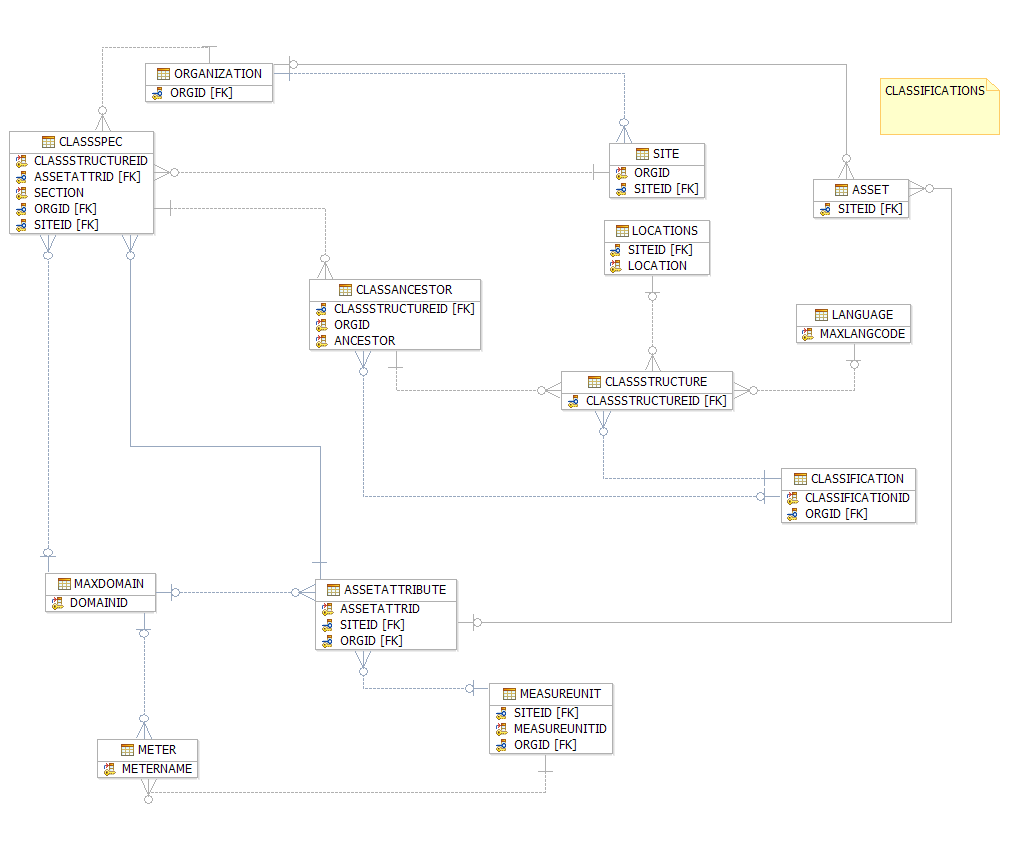
However, non-persistent does not mean impossible to query, validate, or reproduce. It means the value is derived through Maximo application logic. In Maximo's Database Configuration Application, the Maximo data dictionary, MBO relationships, and Java classes behind the asset catalog objects, that logic is related to the ASSETCATALOG Maximo Service. Please see the attached Maximo ERD.
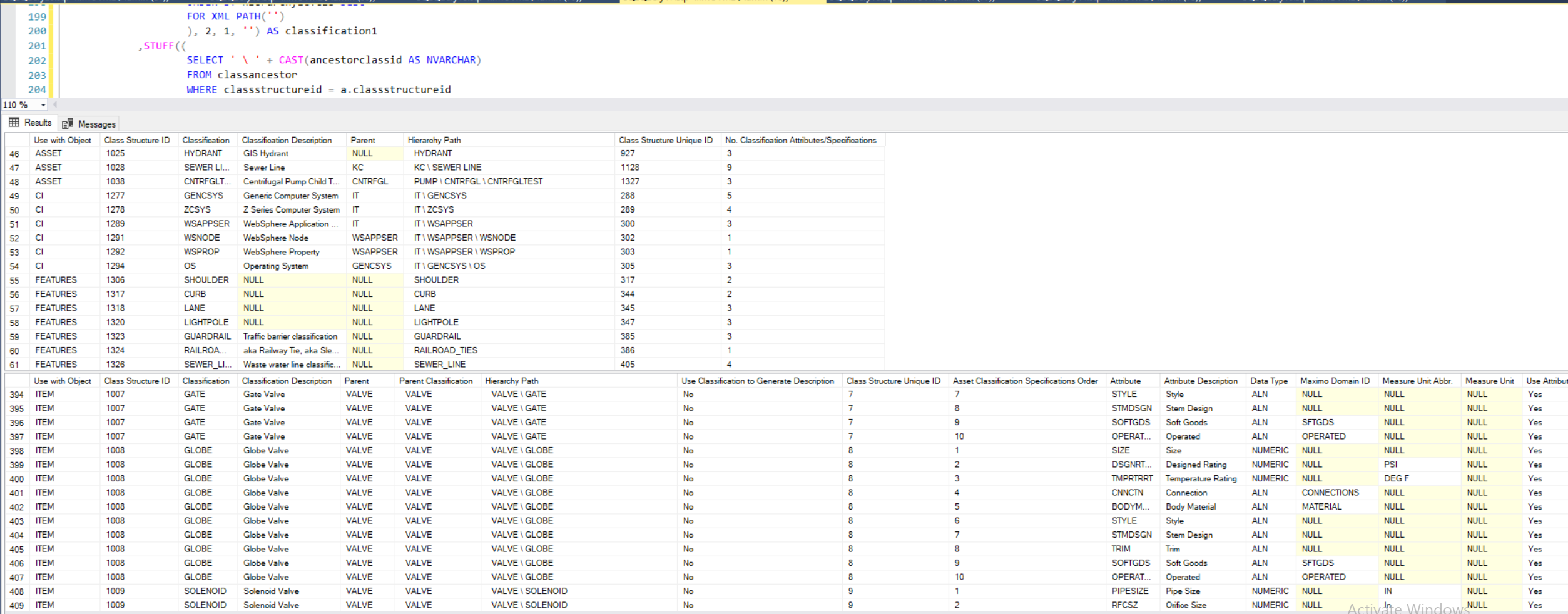
The classification hierarchy and specification configuration can be rebuilt from the persistent Maximo asset catalog and classification tables. Please see the attached queries, validated in SQL Server and Oracle databases, but need validation in DB2.
It is possible to further drill down into Maximo Objects to further validate data at the Object level. Let me know if you have any questions; I've used the logic extensively over the past eight years in DB2, Oracle, and SQL Server databases.
Key Maximo Objects, Java Classes, and Descriptions
|
Object / Table
|
Java Class / MBO Set
|
Object Description
|
|
ASSETATTRIBUTE
|
psdi.app.assetcatalog.AssetAttributeSet
|
Attribute or property of an asset, item, or location.
|
|
CLASSANCESTOR
|
psdi.app.assetcatalog.ClassAncestorSet
|
Class structure ancestors used to rebuild classification hierarchy.
|
|
CLASSIFICATION
|
psdi.app.assetcatalog.ClassificationSet
|
Classification used to categorize assets and related records.
|
|
CLASSSPEC
|
psdi.app.assetcatalog.ClassSpecSet
|
Classification template for asset specification attributes. Maximo Java documentation describes ClassSpec as the MBO representing class specifications and notes that key attributes include ClassStructureId, Section, and AssetAttrId.
|
|
CLASSSPECUSEWITH
|
psdi.app.assetcatalog.ClassSpecUseWithSet
|
ClassSpec use-with table. Defines where class specification attributes are used.
|
|
CLASSSTRUCTURE
|
psdi.app.assetcatalog.ClassStructureSet
|
Structured hierarchy of asset classifications. Maximo Java documentation describes ClassStructure as the MBO representing class structure and states that ClassStructureId is the primary unique identifier. [ibm.com]
|
|
CLASSUSEWITH
|
psdi.app.assetcatalog.ClassUseWithSet
|
Contains class structure use-with information.
|
|
FEATURESPEC
|
psdi.app.feature.FeatureSpecSet
|
Feature specification table.
|
|
LINKCLASSSPEC
|
psdi.app.assetcatalog.virtual.LinkClassSpecSet
|
Non-persistent table for linking specifications to an asset.
|
|
LNKCLAUSEATRNAME
|
psdi.app.rcnlnkrule.ReconLinkClauseSet
|
Joins CLASSSPEC and ASSETATTRIBUTE.
|
|
MEASUREUNIT
|
psdi.app.assetcatalog.MeasureUnitSet
|
Measurement units used by classification/specification attributes.
|
|
SEARCHATTRIBUTE
|
psdi.app.assetcatalog.virtual.SearchAttributeSet
|
Non-persistent table for attribute search.
|
Please use the SQL queries that rebuild and validate the classification hierarchy and specification configuration from these underlying Maximo objects.
These queries provide both summary and detail analysis for: I did not provide the query in the last column, the reference is an example of the ability to extend the logic to drill down into each classification's actual data, to draw meaningful insights.
|
Analysis Area
|
What the Queries Validate or Reconstruct
|
|
Classification hierarchy
|
Rebuilds the hierarchy path from CLASSSTRUCTURE and CLASSANCESTOR.
|
|
Parent / child classifications
|
Identifies parent classifications and child classification paths.
|
|
Use-with configuration
|
Shows where classifications and class specifications are used.
|
|
Classification specifications
|
Lists classification attributes and specification configuration.
|
|
Attribute sequence
|
Validates attribute/specification order.
|
|
Attribute metadata
|
Shows data type, domain, measure unit, and description-generation settings.
|
|
Attribute/specification counts
|
Summarizes number of specifications by classification.
|
|
Loaded classified assets
|
Validates classified asset records and loaded asset specification completeness.
|
ASSET CATALOG ERD:
CLASSIFICATIONS ERD:
SQL SERVER QUERY EXAMPLE:
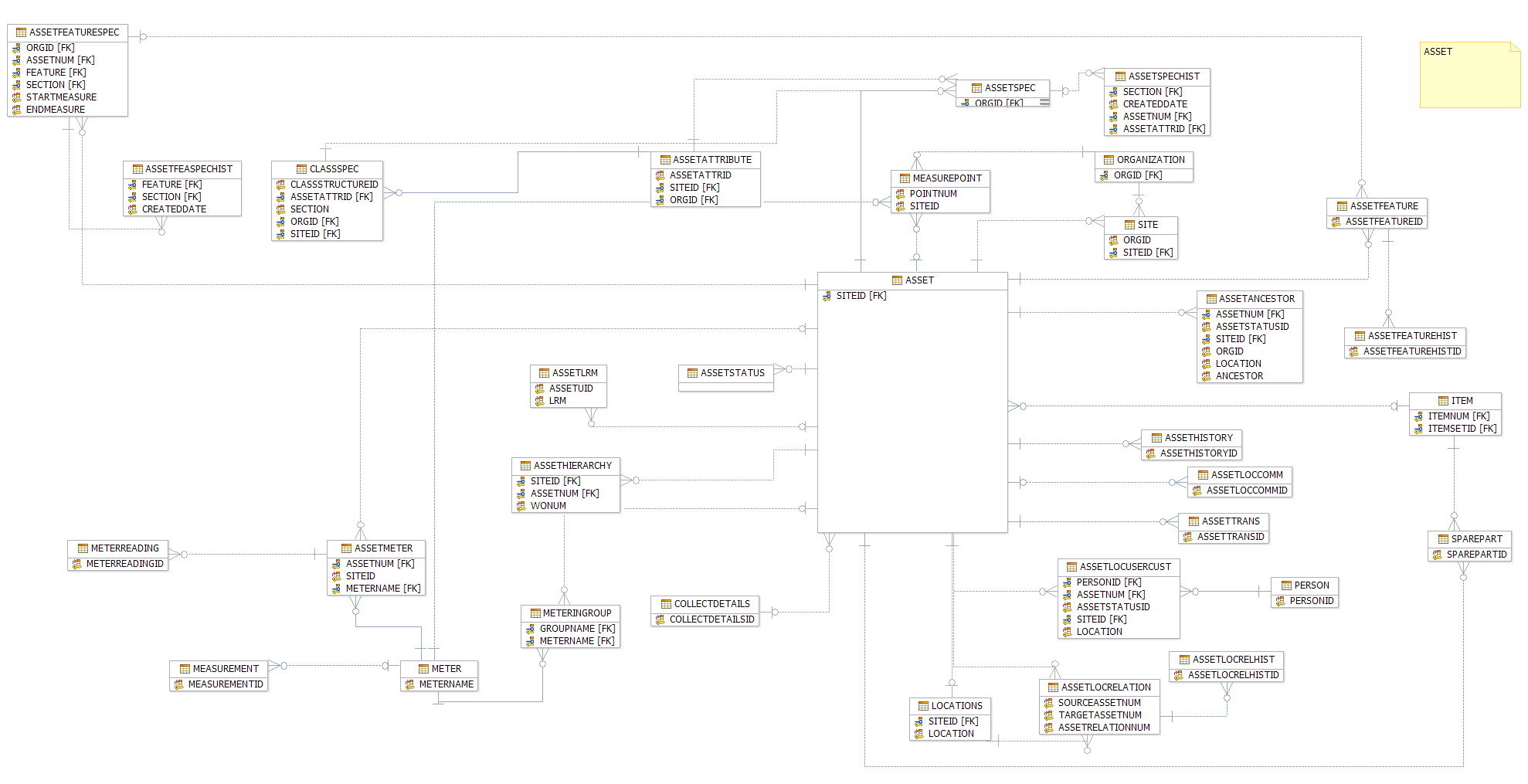
Query Extendability ERD Reference: The Classification Tables below are a visualization of the expandability of the attached queries for the Asset ERD
Best,
------------------------------
Fredrick Ndwaru
Perpetual Ignition
------------------------------