Maximo Open Forum

 View Only
  • 1.  OCR and Maximo for Labor Reporting

    Posted 10 days ago

    Good after all,

    Is anyone using OCR solutions to import data into Maximo ?

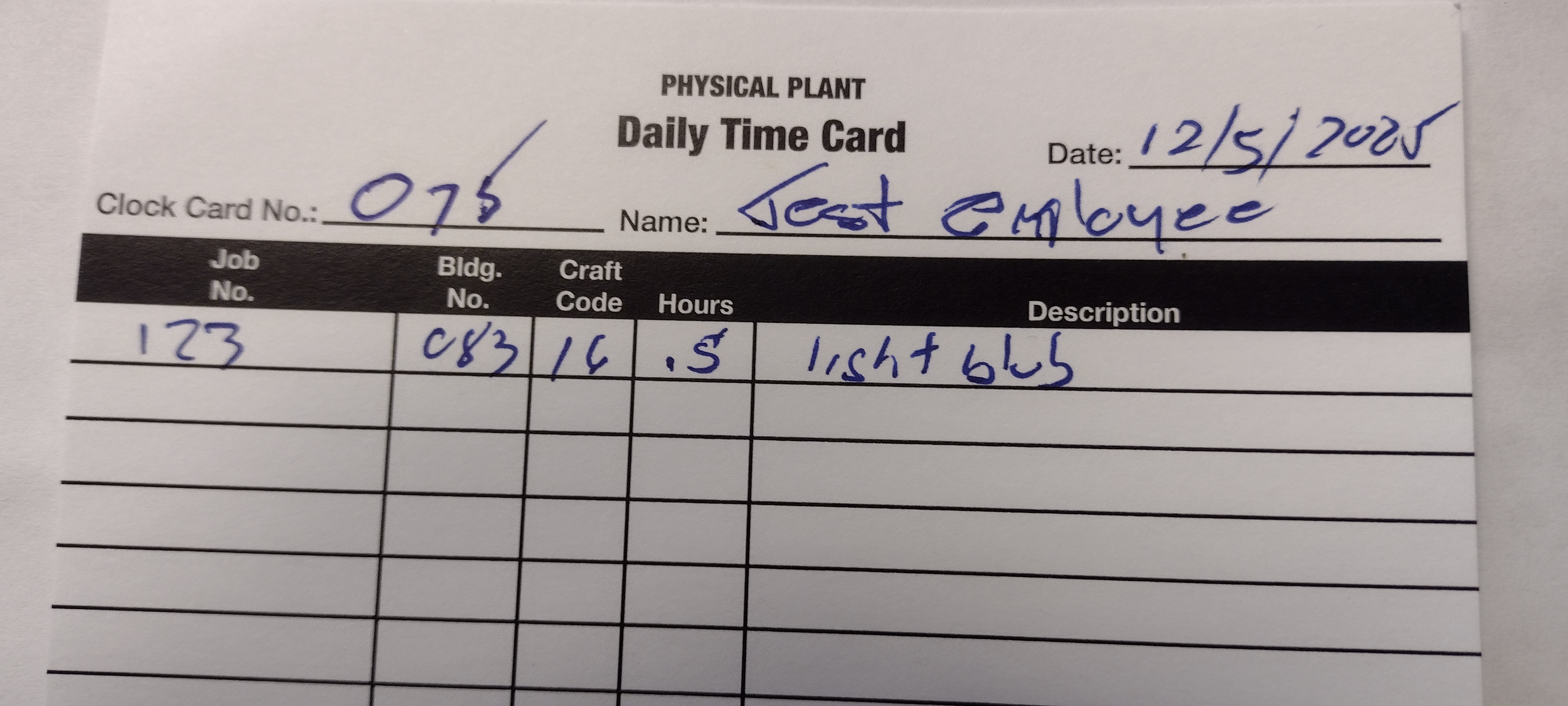
    We have staff complete daily time cards that are related to either a building or a work order.

    These cards are manually entered into Labor Reporting application, very time-consuming.

    So I'm just starting to look into OCR solutions and didn't want to waste time if others already have traveled this road.

    Below is a sample of the card. Yes the writing is bad, because I was testing Google OCR to see how accurate it would be, it was so, so. 
    Thanks


    #Integrations

    ------------------------------
    D Keith Henderson
    University of Louisville Physical Plant
    ------------------------------


  • 2.  RE: OCR and Maximo for Labor Reporting

    Posted 7 days ago

    My Thoughts are that you would spend as much time reviewing the OCR import due to differences/inconsistencies in people's writing that it would not save you anytime. Have you considered going mobile? There's many options out there and some very simple to set up and use. One being OPQO.  
    https://www.naviam.io/products/mobile/opqo


    ------------------------------
    Lee Daley
    Naviam
    ------------------------------


  • 3.  RE: OCR and Maximo for Labor Reporting

    Posted 7 days ago

    Or you can use Maximo Mobile or role-based Maximo applications which are included in Maximo Application Suite now and don't require any additional licenses or AppPoints. 


    ------------------------------
    Greg Tsarev
    MRM-EAM Consulting Inc.
    ------------------------------


  • 4.  RE: OCR and Maximo for Labor Reporting

    Posted 7 days ago
    Edited by sun kim 7 days ago

    If you're open to using AI, Google has some free tiers like Gemini 2.5 Flash which you can set up for free. As long as you don't have to load thousands of labor hours, you should be able to utilize it for free. A workflow could be the following:
    * attach the image to doclinks for that work order
    * an automation script triggers a call to the Google API (you need API key) via Automation Script. 
    * You give it context like a Google doc w/ failed OCR result and what the correct data is. The order of the fields in the image (date, clock card number, name, job no, bldg no, craft code, hours, and description). Set up constraints like like how many digits for each field should have, the range of numbers these fields can contain, how many characters it should expect, and names of your employees. The more context and constraints the better. Tell it is output it as JSON. After the JSON is returned, you add that labor entry into the work order.

    Its better then Tesseract OCR or others because you give it more context and constraints which help it figure out the edge cases better. The Google doc with failed OCR attempts also help w/ future accuracy.

    There are other models like DeepSeek OCR (on Hugging Face and Vertex AI if you have Google Enterprise subscription), but they charge for API calls. The free tier is something you can do as a POC. Should be able to process hundreds of images per day even with the Google doc. 


    ------------------------------
    sun kim
    ------------------------------