Hi Steven,
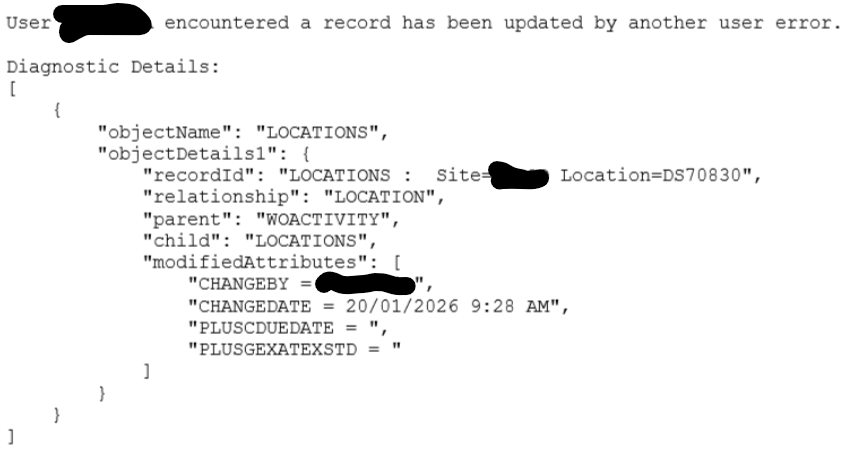
Appreciate your suggestion on this. After applying it, we observed that the system log still does not show the actual user who updated the location/asset/PM, instead, it continues to display my name.
For context, this PM is linked to either location or asset, and it is schedule-based. The issue occurs across multiple locations and assets, not just a single case. At this point, we are still facing the same problem.
Have you encountered a similar issue before? If so, could you please advise on the possible cause or recommend how we should proceed?
------------------------------
Nor Herman Afandi
------------------------------
Original Message:
Sent: 11-26-2025 08:40
From: Steven Shull
Subject: Work Order and Preventive Maintenance Error ("Has been updated by another user"
I have seen the updated by another user error in various PM related bugs but can't think of a scenario off the top of my head when it occurs on the LOCATIONS object.
Is this a PM record tied to the location (rather than an asset or route)? And is it schedule based or meter based? And is it all PMs for all locations or just this one specific location/PM?
What I like to do to triage this scenario when you can reliably recreate it is to turn on sql logging to INFO for just the locations object. IE create a new child logger of LOCATION.LOCATIONS with its log level set to INFO.

Save and apply settings. Then recreate the issue and disable the logging.
What this does is help you understand how locations are being fetched along with what is being modified on the locations object. This can help you identify where the problem might be. It is possible, for example, that a custom automation script is updating the locations record on work order save and is using a different relationship to get the record.
I would recommend since you're on 7.6.1.3 (newer MAS versions have a system property to disable automation scripts) to turn on admin mode in a lower environment and try to recreate the issue. That can potentially eliminate or help confirm an automation script as the issue. It's not perfect because it does disable other things (such as publish channels) which could potentially lead to the issue. But is still helpful in trying to pinpoint.
------------------------------
Steven Shull
Naviam
------------------------------