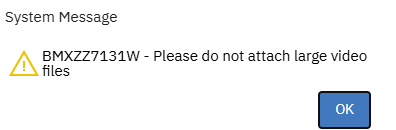
Depending on when you want the notification to show.
- If you want it to show before the user selecting a file, I suggest you keep it simple by adding a Label in the "Add New Attachment" dialog. To do it, you will have to export the Library XML (in Application Designer), then edit the dialog with ID "addnewattachmentfile".
- If you want it to be displayed when the user is adding a file:
- Create a "Warning" message in the Database Configuration app > Messages.
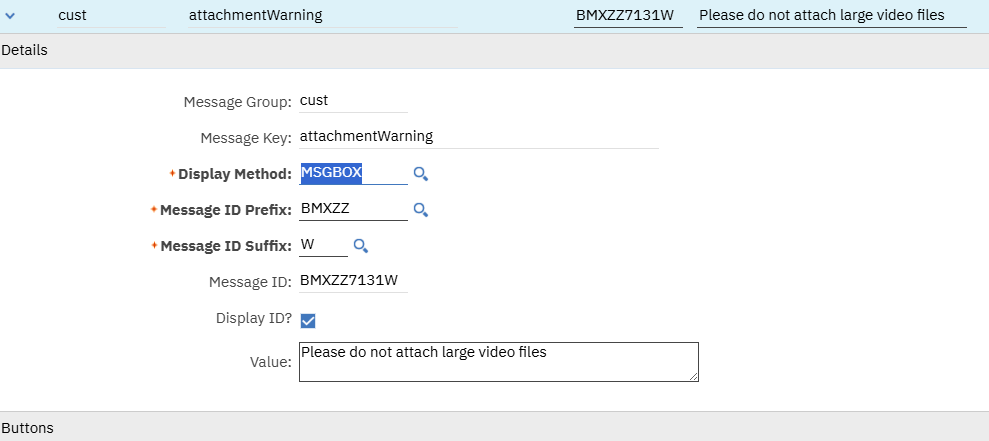
-
- Create an automation script on the Save event of the Doclinks object. In the script, you can display the message by calling the service.setWarning method as follows
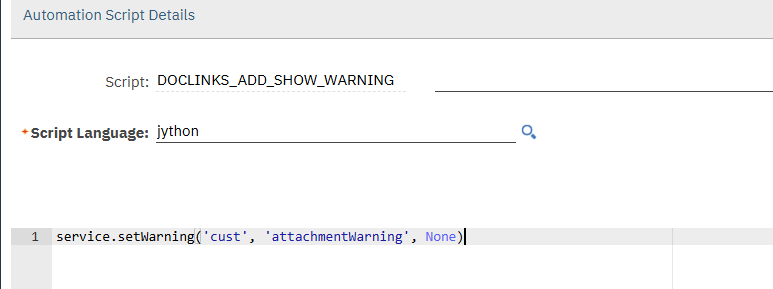
-
- When adding an attachment file, while the file is being added, Maximo will show a warning, but still let the user uploading the file. If you want to block the user from doing it based on certain logic, you can use service.error('cust', 'attachmentWarning') to throw an error instead.