It seems like you have found the MAF configuration (either docker container for 9.0 and earlier or in the MAS UI for 9.1+) which is where you need to be. If you're on 9.0 or earlier, when you run the docker container you are supposed to mount a local directory where all the files are extracted. For example, when I run it, I have this as one of my parameters:
-v /mnt/c/Users/StevenShull/Downloads/mobilews/9018:/graphite/.workspace
I use WSL (Windows Subsystem for Linux) to run the docker container. When you authenticate to a URL, inside the folder specified here (/Downloads/mobilews/9018) a new folder will get created in the format USERNAME-DNS. EX: MAXADMIN-maximo.mydomain.com
Once you open an app in the configuration utility, it will create an additional folder for that app in this directory. This will extract all the files to your local computer. For example, if you open ICMOBILE you would have a folder structure like:
/Downloads/mobilews/9018/MAXADMIN-maximo.mydomain.com/ICMOBILE/src
Inside this folder is where all the app specific logic resides including your custom code and anything shipped out of box.
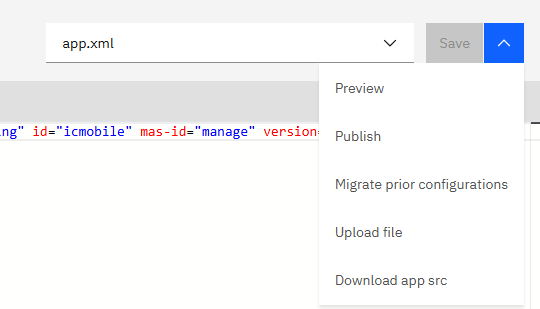
If you are on 9.1, because the files reside inside OpenShift, there was a new menu option added to download the source. When you open an application, click the menu in the top right and choose "Download app src". This will download that zip for you to see.
Regarding the configuration change, I would try to add a button that takes you to the adHoc page with the item you're looking to adjust pre-filtered. If you do this cleanly, your configuration changes on the reconciliation page are small (a button on the screen that navigates you to a different page & applies a QBE to the datasource) and you are able to re-use all the existing logic for handling the physical count. That way you're not providing two separate flows for executing a physical count that you need to test, maintain, etc. independently of each other. I think of it like following the Go To in classic Maximo. It's OK to have the user navigate from WOTRACK->ASSET to see or change some information. But you want it to be frictionless, so they aren't being forced to navigate to the alternate page and filter the datasource themselves.