Maximo Open Forum

 View Only

 MAF Datasource saving issues

Jump to  Best Answer
  • Administration
Khalid Tarek's profile image
Khalid Tarek posted 12-15-2025 17:14

Hey there! 

I've been working on kind of a personal project with MAF; in a nutshell I've been trying to add a "surveys" page to the "Self Serve" application. I've already configured my own custom survey logic on Manage and it's working perfectly, and so far I've kind of configured a big chunk of it on self serve:

  • I added a card group including my open surveys 
  • Clicking on any of these surveys routes me to a new page called "surveys" that lists my answers neatly
  • Each answer has either star ratings, yes or no answers or a free form answer. 
  • Finally, there's a "submit button". 

All that has been configured visually, but my problem here is that, all of it can not be mutated from the self serve portal. I mean I can click on the star rating, and it functions as you'd expect, but it doesn't save to the Manage database, even thought I am using maximo-datasource which theoretically should autosave. I do click on the submit button which calls an API and that API does run, but I am unable to save any changes in he data of the maximo-datasource

I am using nested datasources, as well as not using any kind of controller for these datasource. Could this be the issue here? Is there some sort of guide I could be referencing regarding using datasources? I have read the MAF developer documentation but I am unable to extract the information I need from it. 

Here's the relevant snippet from my code for reference:

<maximo-datasource id="surveyresponse" object-structure="MYSURVEYS" pre-load="true" where="surveyresponseid={page.params.surveyresponseid}" selection-mode="none" auto-save="true">
        <schema id="a1_asdga8j5">
          <attribute name="surveyresponseid" searchable="true" title="Response ID" unique-id="true" id="a1_amzasd8x"/>
          <attribute name="description" searchable="true" title="Description" id="a1_asdqwngjs"/>
          <attribute name="responder" searchable="true" title="Responder" id="a1_asdqwngj"/>
          <attribute name="creationdate" searchable="true" title="Creation Date" id="a1_rgxasdnz"/>
          <attribute name="status" searchable="true" title="Status" id="a1_anasd78w"/>
          <attribute name="completiondate" searchable="true" title="Completion Date" id="a1_qasdnmp9"/>
          <attribute name="recordid" searchable="true" title="Record ID" id="a1_asdqnasmp9"/>
          <attribute name="ticket" id="a1_axw3asdj">
            <attribute name="ticketid" searchable="true" title="Ticket ID" unique-id="true" id="asdf1_asdje9n5"/>
            <attribute name="description" searchable="true" title="Description" id="aasd1_jwsdf3vk"/>
          </attribute>
          <attribute name="rel.surveyanswer{surveyanswerid, question, answer, order, mandatory, weight, description, type}" id="a1_p2yyz"/>
        </schema>
        <!-- <maximo-datasource id="surveyanswer" relationship="SURVEYANSWER" selection-mode="none">
          <schema id="a1_j46rz">
            <attribute name="*" searchable="true" title=" " unique-id="true" id="a1_ymk7_"/>
            <attribute name="rel.ANSWERCHOICES{answer, description, weight}" id="a1_j49e8"/>
          </schema>
        </maximo-datasource> -->
      </maximo-datasource>
      <box id="a1_b2r58" direction="column">
        <label label="Description: {surveyresponse.item.description}" id="a1_rbdev"/>
        <data-list id="a1_qzmr_" datasource="{surveyresponse.item.surveyanswer}" no-select-behavior="true" hide-single-select-icon="true" show-search="false" show-single-select-icon="false">
          <button on-click="submitSurveyResponse" on-click-arg="{surveyresponse}" label="Submit" id="a1_vwn6r" slot="actions"/>
          <button on-click="saveResponse" on-click-arg="{surveyresponse}" label="Save" id="a1_vwnds6r" slot="actions"/>
          <adaptive-row slot="item" id="a1_p3z3b">
            <adaptive-column large-width="5" medium-width="5" small-width="5" xlarge-width="5" id="a1_drejk">
              <box fill-parent-vertical="true" vertical-align="center" id="a1_n6v6a">
                <label label="{item.order}" id="a1_q2s5w3"/>
              </box>
            </adaptive-column>
            <adaptive-column large-width="60" medium-width="60" small-width="60" xlarge-width="60" id="a1_vx937">
              <box fill-parent-vertical="true" vertical-align="center" id="a1_ejr53">
                <label label="{item.question}" id="a1_sq2s5w3"/>
                <label label="{item.answer}" id="a1_sq2s5ew3"/>
              </box>
            </adaptive-column>
            <adaptive-column large-width="35" medium-width="35" small-width="35" xlarge-width="35" id="a1_wyarq">
              <rating empty-color="grey" fill-color="Orange" maximum="5" value="{item.answer}" id="a1_maryj" hidden="{item.type != 'RATING'}"/>
              <smart-input value="{item.answer}" label="Answer" id="a1_e5762" hidden="{item.type != 'FREEFORM'}"/>
              <box hidden="{item.type != 'YN'}" id="a1_xavkn">
                <button label="Yes" on-click="selectYes" on-click-arg="{item}" id="a1_rd79n"/>
                <button label="No" on-click="selectNo" on-click-arg="{item}" id="a1_pjex2"/>
              </box>
            </adaptive-column>
          </adaptive-row>
        </data-list>
      </box>
Steven Shull's profile image
Steven Shull  Best Answer

This isn't specific to the MAF, but Maximo will only process updates to the record if it's part of the object structure. You can retrieve any data you want through relationships, but if you need to submit that data back to Maximo, it must be part of the object structure, and you must be using the same relationship as defined on this object structure. Since this is a custom object, I can't mock it up easily, so I'll show you what I mean using an out of the box object structure. 

Out of box we have MXWO which only contains WORKORDER data. 

I have duplicated this object structure and configured security so I can use the object structure. I can then make a GET request to the API like this:

/maximo/api/os/nvmwo?lean=1&oslc.select=wonum,rel.assignment{laborcode,craft,laborhrs,assignmentid}&oslc.where=wonum="1001"

That returns me a response like this:

    "member": [
        {
            "_rowstamp": "[0 0 0 0 1 45 -74 -75]",
            "assignment": [
                {
                    "craft": "MECH",
                    "assignmentid": 4,
                    "laborhrs": 2.0,
                    "laborcode": "CALDONE"
                },
                {
                    "craft": "MECH",
                    "assignmentid": 5,
                    "laborhrs": 2.0,
                    "laborcode": "CALDONE"
                },
                {
                    "craft": "ELECT",
                    "assignmentid": 6,
                    "laborhrs": 2.0,
                    "laborcode": "CALDONE"
                },
                {
                    "craft": "ELECT",
                    "assignmentid": 562,
                    "laborhrs": 1.0,
                    "laborcode": "MAXADMIN"
                }
            ],
            "href": "https://URL/maximo/api/os/nvmwo/_QkVERk9SRC8xMDAx",
            "wonum": "1001"
        }
    ]


We get the wonum and all the assignments. If I wanted to update an assignment, the assumption most people would make is to create a POST request (with the x-method-override header of PATCH and patchtype header of MERGE) to that HREF with a body like:

{
    "assignment": [{
        "laborcode": "WILSON",
        "assignmentid":6
    }]
}

The request will succeed, but if you retrieve the data, you will see the assignment hasn't changed. That's because ASSIGNMENT is not part of the object structure. Since security is at the object structure layer, it makes sense that you cannot manipulate data that is not part of the object structure. Otherwise, anyone could update any record in the system. 

If I add the assignment object to the NVMWO object structure 
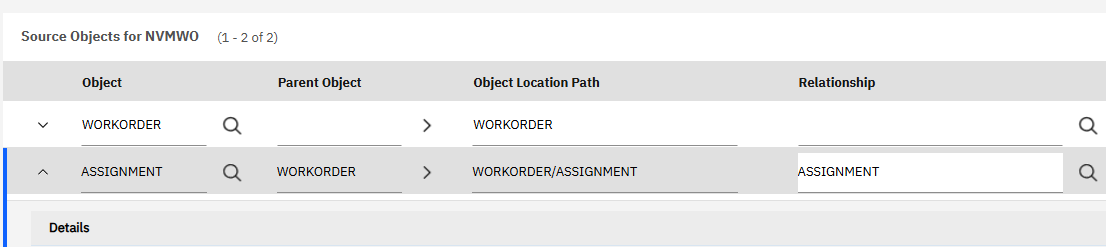


And submit the same request, it now processes successfully and updates the assignment. Instead of using rel.assignment{laborcode,craft,laborhrs,assignmentid} in the select I can also use assignment{laborcode,craft,laborhrs,assignmentid}. This is the object name (not relationship name) which ensures that if the relationship is later changed you'll continue to use the proper relationship. It's important to be aware that even if this was part of the object structure, if you retrieve it using the rel. notation it will never be updateable. You would need to use the objectname{} notation to get the necessary data.


You then declare the child datasource as an attribute without using the getChildDatasource function. This is required to setup the datasource properly.