Maximo Open Forum

 View Only

 Read-only Fields

Jump to  Best Answer
  • Inventory
Jason Johnson's profile image
Jason Johnson posted 08-19-2024 10:58

Our "Primary Vendor" section on Inventory records is read-only after creation. Is this normal? If so, how are these fields supposed to be updated? I understand there is the list of vendors that can hold this data, just wondering about this particular section. It seems to be related to the "Internal" flag, but that is read-only, too.

Steven Shull's profile image
Steven Shull  Best Answer

We have always had the capability to flag a part as being replenished from a particular storeroom. In newer versions of Maximo, in the Storerooms application we added an action "Select Reorder Storeroom". This indicates that all inventory for that particular storeroom needs to be replenished from another storeroom. If you had a central warehouse for example that needed to stock a satellite warehouse, that's what you would use to indicate that you wanted to transfer from the central warehouse to the satellite warehouse and then replenish the central warehouse using normal inventory reorder process.

When you use the new feature in the storeroom application, that makes the internal, storeroom, and storeroom site and other fields read-only for all items in the storeroom. I'm not sure if it was intentional or accidental in your use case but someone has done that for this storeroom. To clear this flag, you would open the storeroom, use the Select Reorder Storeroom action, and then click OK with no Reorder storeroom in the list. 

Martin Fabra's profile image
Martin Fabra

Hi !

In a demo version that I use, INTERNAL is released and can be defined, the same as the "PRIMARY VENDOR" field, although some items are blocked.

Regards!

Jeff Anderson's profile image
Jeff Anderson

The internal Check and storeroom  function are instead of the vendor data, its one or the other. It has several purposes but it allows another Storeroom to be the main or Purchasing store room.  Think of it like a remote secondary storeroom, because you wouldn't want to process orders for every storage closet all over your property individually you set one store room as the primary location for the item and the main feeds all stock to the remote locations as it's consumed and you point the replenishment towards that single main storeroom with the internal flag.  It still generates a "PR" when you trigger ROP but shows the call to the Storeroom rather than a vendor for replenishment.

  I specifically use this feature to maintain back stock with some larger items. 1 is kept easily accessible in a storage cabinet and when it's consumed the PR pulls a request to transfer one from back stock to main stock. Then if we have consumed enough backstock a PR generates to the vendor for the PO to buy more. 

Hope this helps. 

Jeff

Craig Kokay's profile image
Craig Kokay

Hi Jason,

As Steven has mentioned, there reason that both of these fields are read-only is because someone has used the Select Reorder Storeroom option in the Storeroom application.  When used the applies that storeroom as the Primary Vendor.
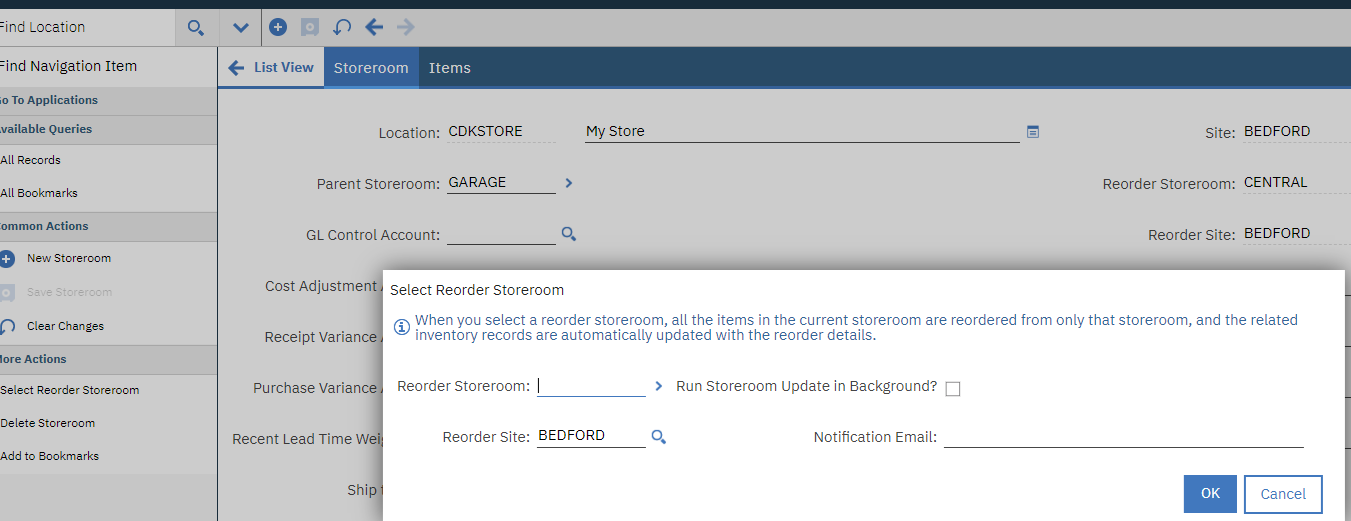
You will need to follow Steven's suggestion of removing that value.  Of course, that does mean that all items in the store will now have no primary vendor.  I would recommend that you follow-up and apply the Primary Vendor then to each item in the store (if known).

Primary vendor

If you define a vendor, you can at any stage select a storeroom to replace the vendor.  When you do this the Vendor field becomes read-only and to revert back to the vendor you have to uncheck the Internal? flag.  There will be a delay between the operations, but for those of course, I can't wait so I save then complete the change.

Hope that helps.

Regards, Craig

Principal Consutlant, COSOL

#IBMChampion