Maximo Open Forum

 View Only
  • 1.  Add toolbar menu to application

    Posted 11-22-2024 03:45

    Hi,

    Could you please let me know how can I add a toolbar menu to an application in MAS 8/9?

    Something like in the print screen below.

    Thank you,

    Dragos


    #Administration
    #Assets
    #Customizations
    #EndUser
    #EverythingMaximo
    #Integrations
    #Inventory
    #LifeScience/Calibration
    #MaximoApplicationSuite
    #MaximoUserGroups
    #Mobility
    #Security

    ------------------------------
    Dragos Chitu
    EL
    ------------------------------


  • 2.  RE: Add toolbar menu to application

    Posted 11-22-2024 08:12

    Go to the Application in Application Designer, and choose Add/Modify toolbar Menu option from More Actions
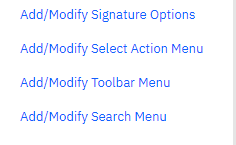
    Add the SIGOPTION that you need displayed on the Toolbar.

    You may want to add the option in the System Property: mxe.webclient.showOnToolbar, in case you do not see the option that you just added.



    ------------------------------
    Niv Geo
    ------------------------------


  • 3.  RE: Add toolbar menu to application

    Posted 11-22-2024 08:55

    Hi Niv,

    Thank you for your reply!

    I know how to add an option to the toolbar, my question was how to add the toolbar itself to the application. :)

    I'm interested especially to have the Quick Search menu (the one behind the three dots icon).

    Thank you,

    Dragos


    ------------------------------
    Dragos Chitu
    EL
    ------------------------------


Newest Episode
Ep. 4 | System Properties in IBM Maximo

Watch Steven Shull walk through practical IBM Maximo system properties that can improve usability, query behavior, attachment handling, and the overall Maximo user experience.

MORE by Naviam Episode 4 cover
Watch Episode 4
Also available: Ep. 3 | Work Order Role-Based Application