Hi @Gary Sharma!
You need to make a new condition:
OWNGRP_NONULL - Ownergroup is not null
:ownergroup is not null
Then, you need to go to the "Security Groups" application to the "Global Data Restriction" option.
There, in "Attribute Restriction" define a new one.
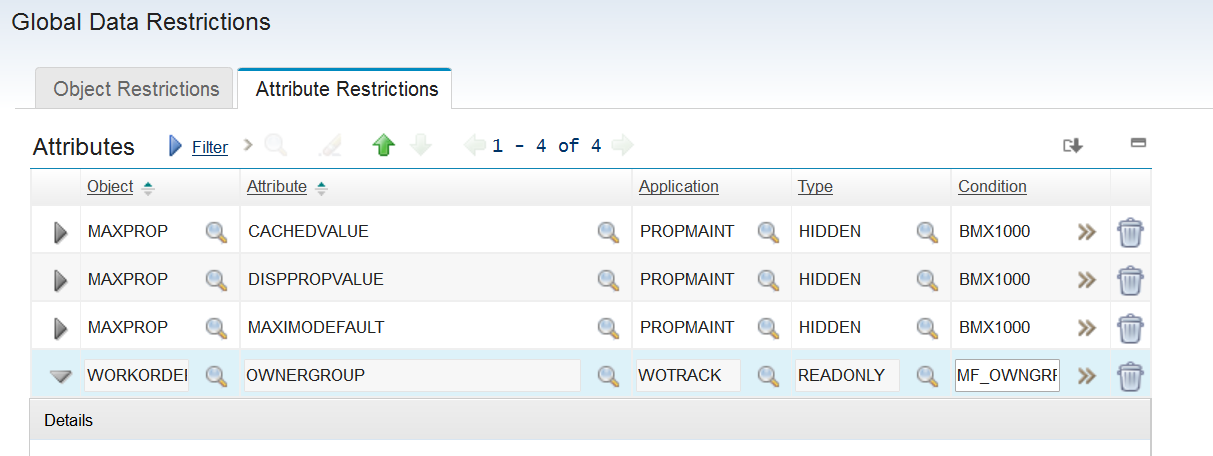
Here, there will be several depending on the applications where you want to apply the configuration (WOTRACK, INCIDENT, SR, etc.). Let's suppose WOTRACK:
Object: WORKORDER
Atribute: OWNERGROUP
Application: WOTRACK
Type: READONLY
Condition: OWNGRP_NONULL
What this does is, for all users, when they use WOTRACK, the OWNERGROUP attribute will be read-only when it is not empty, doing what you want.
Now, that OWNEGROUP field is READONLY by default and is registered with the "select owner" option that each application has. It must be that in your case someone removed the readonly attribute and that is why it's possible register it manually, but by default it is always readonly.
Regards!
------------------------------
Martin Fabra
ARSAT S.A. - Actively seeking employment
------------------------------