Maximo Open Forum

 View Only
  • 1.  Default search criteria on List View for all users

    Posted 08-13-2025 11:24

    Hello MORE Community,

    I would like to add a default search criteria in the Assets application to only show OPERATING assets by default.  This would be a similar functionality to the Inventory application list view that excludes OBSOLETE items in the list view by default.

    Could anyone please tell me where to set this value at so that it is the default value for all users?

    Thank you in advance,


    #Administration
    #Assets
    #EndUser
    #EverythingMaximo
    #Inventory

    ------------------------------
    Danny Richardson
    Maximo Administrator Manager
    Technimark LLC
    ------------------------------


  • 2.  RE: Default search criteria on List View for all users
    Best Answer

    Posted 08-14-2025 09:27

    There are several possibilities. In all cases, adjustments must be made in the application designer.

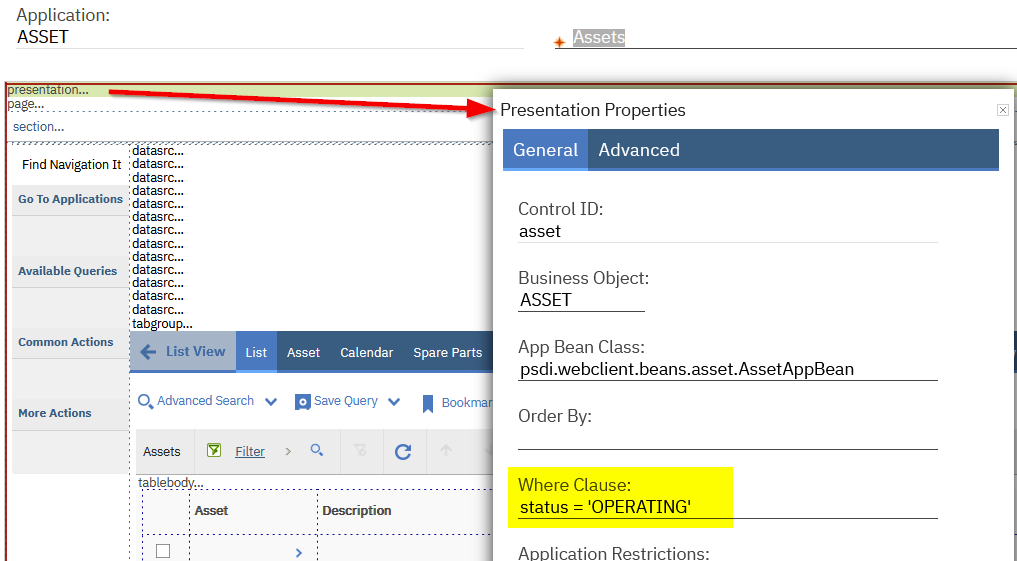
    Option 1:

    Add a where clause in the properties of the "presentation". The disadvantage of this solution is that the filter criteria is not visible in the filter field of the list view.

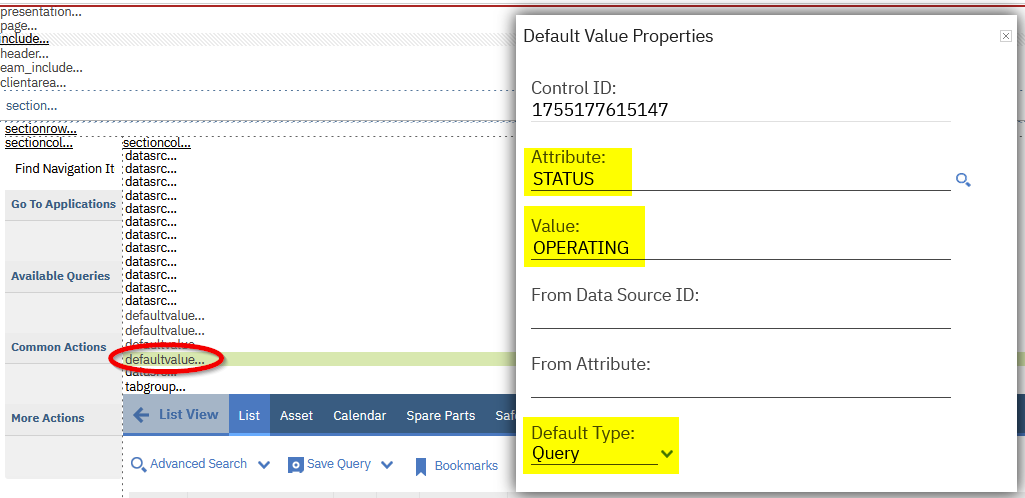
    Option 2:

    Use the "Control Palette" and add a Default Value. Set the properties as marked. With this solution, the search field in list view will be auto populated with the specified value.


    ------------------------------
    Beat Keller
    Naviam
    ------------------------------


  • 3.  RE: Default search criteria on List View for all users

    Posted 08-15-2025 13:22

    @Beat Keller Thank you so much!  The second option I think will be my best option.


    ------------------------------
    Danny Richardson
    Maximo Administrator Manager
    Technimark LLC
    ------------------------------


  • 4.  RE: Default search criteria on List View for all users

    Posted 3 days ago
    Edited by Danny Richardson 3 days ago

    @Beat Keller I've noticed that when I add a defaultvalue it dissappears and so if I want to go edit it again in application designer, it's not there.  I tried toggling other views and that didn't work either.  Do I need to do something to show the defaultvalue added to be able to edit it? 

    Update:  I did see that it is in the XML so if I export that I believe I can edit it there, but was trying to see if there is a way to do it directly in the UI in Application Designer.  Thank you.


    ------------------------------
    Danny Richardson
    Maximo Administrator Manager
    Technimark LLC
    ------------------------------


  • 5.  RE: Default search criteria on List View for all users

    Posted 2 days ago

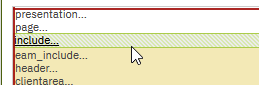
    Hi @Danny Richardson I know, in 7.6 this can be a bit tricky. Load the asset application in Application Designer. In the Select Action menu, choose Toggle Show all Controls. And in most of the times, screen is not refreshing complete. So, klick on "presentation..." at the very top of the design frame, and then click on "include...". Normally, a screen refresh is done and the "defaultvalue..." is visible. If not, klick also on "page..." or somewhere else, till the refresh is made.


    ------------------------------
    Beat Keller
    Naviam
    ------------------------------


  • 6.  RE: Default search criteria on List View for all users

    Posted 2 days ago
    Hi,
    Food for thought - This automatically excludes OBSOLETE items in the List view.
    A Solution that Applies to All Users
    The clean, common way to achieve this is by adding a Default Value control in Application Designer:
    1. Go to System Configuration > Platform Configuration > Application Designer.
    2. Open the ASSET (Assets) application.
    3. From the Select Action menu, choose Toggle/Show All Controls.
    4. Go to the List tab.
    5. From the Control Palette, drag a Default Value control onto the table body section (or any section on the List tab).
    6. Select the new Default Value control and open its properties:
      • AttributeSTATUS
      • Default TypeQUERY
      • Default Value=OPERATING
    7. Save the application.
    This will automatically apply STATUS = OPERATING as a default filter in the List view for all users (just like the Inventory app does for != OBSOLETE).Users can still remove or change the filter if needed, and it won't interfere if they have their own personal default query saved.
    Charlie


    ------------------------------
    CHARLES LAMB
    Bay Area Rapid Transit
    ------------------------------