Make sure you apply the security template for the Service Requests application in the Security Groups application. These applications use a series of object structures and new ones are added in patches so you should do this anytime you patch Maximo.
For each group you want to access, filter for Service Request in the Description and ensure the Application Type is Tools and Tasks (this is the new role-based/Mobile version).

Hit the Actions->Manage/Apply Template

Then in the Actions->Apply Template
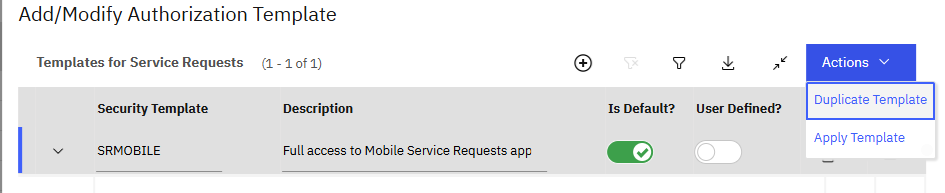
Click OK when you are presented with the system message.
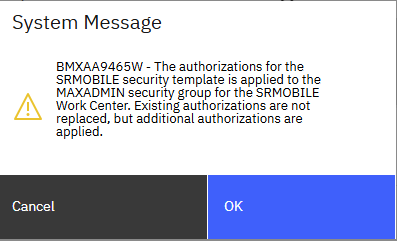
Then make sure you log out of all sessions and log back in.
If that is still not working, make sure the MXAPINUMERICDOMAIN object structure is part of the security template. It should be out of the box, and it was in our environment.
Follow the steps up to but not including the Apply Template. At the bottom of that dialog is the Security Template Authorizations section which will detail every permission that will be granted. Click the two arrows to expand it.

Then switch to the Object Structures Authorization and filter for MXAPINUMERICDOMAIN
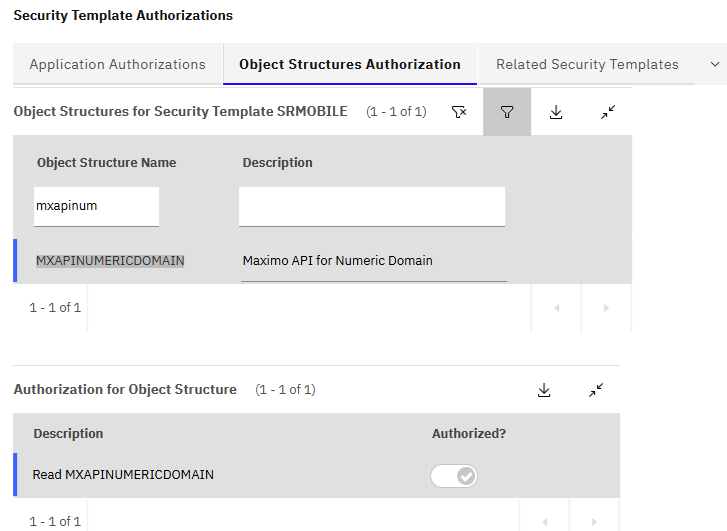
You should see that it is granting READ.
------------------------------
Steven Shull
Naviam
------------------------------