Is the XML format available as a dropdown option in Postman? The selected format is JSON. Ensure there are no formatting conflicts in your URL also.
1. URL Structure (GET & POST)
Maximo APIs require specific base URLs, authentication, and endpoints. Append query parameters directly to the URL.
GET Request Example (Query by ID)
- Fetches a specific Work Order in XML format:
https://<maximo_hostname>/maxrest/rest/os/mxwo?wonum=1001&_format=xml
POST Request Example (Create Record)
- Creates a new record and uses
lean=1 to prevent null records:
https://<maximo_hostname>/maxrest/rest/os/mxwo?lean=1&_format=xml
2. Postman Configuration Example
To run these calls successfully in Postman, follow this setup:
Step A: Authorization
- Open the Authorization tab.
- Select Basic Auth from the Type dropdown.
- Enter your Maximo Username and Password (or API Key).
Step B: Headers
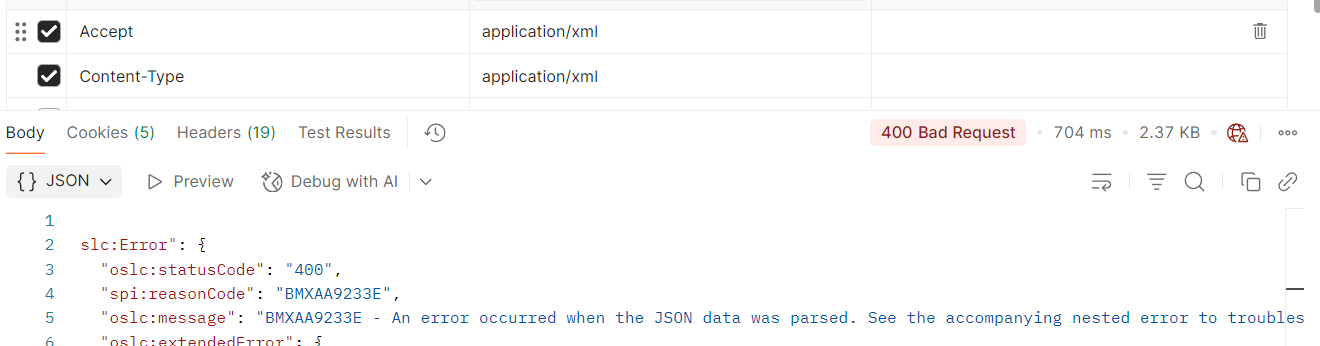
To ensure Maximo correctly interprets your request and returns XML, set these headers:
- Content-Type:
application/xml
- Accept:
application/xml
Step C: Request Body (For POST)
- Open the Body tab.
- Select raw and set the format dropdown to XML.
- Paste the XML payload mimicking your Maximo Object Structure.
Example POST XML Body:
<?xml version="1.0" encoding="UTF-8"?>
<SyncMXWO xmlns="http://ibm.com">
    <MXWOSet>
        <WORKORDER>
            <WONUM>1050</WONUM>
            <DESCRIPTION>Emergency Repair</DESCRIPTION>
            <STATUS>WAPPR</STATUS>
        </WORKORDER>
    </MXWOSet>
</SyncMXWO>
------------------------------
[Fredrick] [Ndwaru]
[Perpetual Ignition]
------------------------------
Original Message:
Sent: 07-06-2026 22:21
From: Munikrishnan Raji
Subject: MAS Integration
Hi Alex,
Thanks for your response.
I'm currently testing the POST method in Postman. When I send the request in JSON format, it is processed successfully. However, when I send the same request in XML format, Maximo returns a JSON parsing error.
Do you have any idea why Maximo is trying to parse the XML request as JSON, or is there any additional configuration required to support XML payloads?
Any guidance would be greatly appreciated.
------------------------------
Munikrishnan Raji
comm-it
------------------------------
Original Message:
Sent: 06-25-2026 08:54
From: Alex Walter
Subject: MAS Integration
The /api route is unprotected so that it can operate in a stateless, session-less manner. The /oslc route is protected in that you need an authenticated session. So theoretically you can use the /oslc route if you have a set of cookies from an authenticated session that you pass as headers to the request.
The majority of the API use cases I've seen are integration use cases and therefore the /api route makes the most sense. However, if you are developing a user interface where a user logs in and performs transactions outside of Maximo, you would likely want to use the /oslc route.
Hope that helps,
------------------------------
Alex Walter
A3J Group LLC
------------------------------
Original Message:
Sent: 06-24-2026 23:50
From: Munikrishnan Raji
Subject: MAS Integration
Hi Alex, Thanks for the response.
The maximo/api/os is working. Do you know why OSLC isn't working in MAS
------------------------------
Munikrishnan Raji
comm-it
------------------------------
Original Message:
Sent: 06-22-2026 08:36
From: Alex Walter
Subject: MAS Integration
Replace the /oslc route with /api and use an API Key in the header. Example:
GET https://mydomain/maximo/api/os/mxapiasset?lean=1&oslc.pageSize=10&oslc.select=assetnum,siteid,descriptionapikey: xxxxxxxxxx
Hope this helps.
------------------------------
Alex Walter
A3J Group LLC
------------------------------