Hi Steven,
Yes! Actually it seems ALL of our items are rotating items (strange, I know), and yes we also have multiple storerooms using one main site. In the example above, LASMQBM and XSTJMAS are in the same site. This probably explains why it's showing up based on the last section. We are on 7.6.1.2 and I see the relationship matches what you have here (9.1) as well.
We may try to find a workaround for this on our end, or wait until it's fixed in 9.1, because I know IBM will not support a solution for 7.6.1.2.
At least now, I know it's not something with the TOSTORELOC filter I can easily fix.
Thanks for your help!
Brenda
------------------------------
Brenda Ngo
Canadian Coast Guard
------------------------------
Original Message:
Sent: 05-01-2026 13:29
From: Steven Shull
Subject: Modify filter in View Inventory Transactions
By any chance, are these items rotating? Looking at the MATRECTRANS relationship for INVENTORY, the out of the box relationship (in 9.1) is this:
itemnum=:itemnum and itemsetid=:itemsetid and ((issuetype in (select value from synonymdomain where domainid ='ISSUETYP' and maxvalue in ('TRANSFER')) and tostoreloc = :location and siteid=:siteid and fromstoreloc is not null) or (issuetype not in ( select value from synonymdomain where domainid='ISSUETYP' and maxvalue ='TRANSFER') and tostoreloc = :location and siteid=:siteid) or (fromstoreloc=:location and fromsiteid=:siteid) or (issuetype in (select value from synonymdomain where domainid='ISSUETYP' and maxvalue='TRANSFER') and rotassetnum is not null and tostoreloc is not null and siteid=:siteid and fromstoreloc is null))
Up until the last portion, that looks accurate. However, the last section is this:
(issuetype in (select value from synonymdomain where domainid='ISSUETYP' and maxvalue='TRANSFER') and rotassetnum is not null and tostoreloc is not null and siteid=:siteid and fromstoreloc is null)
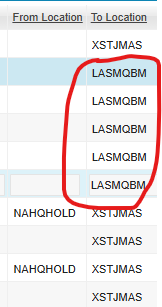
If a rotating item is transferred within the site, it would show up for every storeroom provided that the original location is not a storeroom. For example, if you had asset 1001 that was in operating location ABC and transferred it to storeroom LASMQBM and the storeroom LASMQBM is in the same site as XSTJMAS, it would show up in that scenario. This seems like an IBM bug to me. It should check the tostoreloc is for the current storeroom in my opinion.
------------------------------
Steven Shull
Naviam
------------------------------
Original Message:
Sent: 04-30-2026 16:28
From: Brenda Ngo
Subject: Modify filter in View Inventory Transactions
Hi Steven,
Thank you for your reply! What you say makes sense. I guess I'm just trying to figure out why a transaction would have a blank value in the FROMSTORELOC and then have a different storeroom (not the storeroom I'm currently on) in TOSTORELOC. Using the example below, if I am currently looking at an item that is in the XSTJMAS storeroom, why does it show the LASMQBM storerooms in TOSTORELOC and a blank value in FROMSTORELOC? It would make sense to show this transaction if XSTJMAS showed up in FROMSTORELOC, but these transactions seem to indicate that the items were received straight into LASMQBM. If this is not an issue with the filter, then what could possibly cause the transactions with a blank FROMSTORELOC to show up in this list?
Thanks!
Brenda
------------------------------
Brenda Ngo
Canadian Coast Guard
Original Message:
Sent: 04-29-2026 12:07
From: Steven Shull
Subject: Modify filter in View Inventory Transactions
I'm not sure I understand the request. The inventory transactions are everything inbound or outbound from the storeroom so for every transaction, the storeroom you're on should be listed as either the FROM or the TO location. If your storeroom is CENTRAL for example and you receive a PO, the TOSTORELOC will be CENTRAL. If you transfer items from CENTRAL to GARAGE, the FROMSTORELOC will be CENTRAL and the TOSTORELOC will be GARAGE. You want to be able to see these transactions because they all impact your balance.
------------------------------
Steven Shull
Naviam