Hi Shannon,
I'm not sure how you tried to implement it...
DFLTNEWLOCATION and DFLTNEWBINNUM are fields in ASSETMOVEDFLT table, not in ASSET table.
If you want to apply the second solution then you would rely on NEWLOCATION and MOVEMODIFYBINNUM which are in ASSET table.
An example of the first solution would look like:
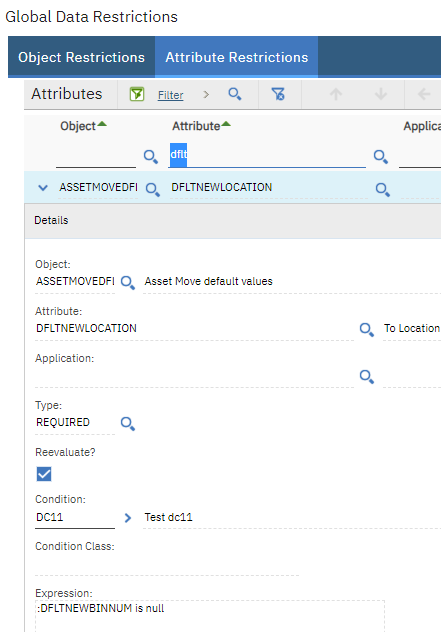
For To Bin field the restriction and condition would look symmetrical.
------------------------------
Dragos Chitu
EL
------------------------------
Original Message:
Sent: 06-05-2023 09:06
From: Shannon Stommel
Subject: Require a Non-Persistent Field
Hi Dragos!
I tried your suggestion and when I set DFLTNEWBINNUM to be required in the conditional expression, I'm receiving the following error when adding the condition to the ASSET.NEWLOCATION attribute:
BMXAA4176E - Attribute DFLTNEWBINNUM does not exist. Gather the logs from the <HOME> directory and determine the process or app referencing the invalid attribute.
Is there a change I need to make to the DFLTNEWBINNUM attribute? When I add the DFLTNEWLOCATION to the condition it works fine.
Thank you,
Shannon
------------------------------
Shannon Stommel
Insteel Wire Products
------------------------------
Original Message:
Sent: 06-03-2023 15:02
From: Dragos Chitu
Subject: Require a Non-Persistent Field
Hi Shannon,
You can apply the restriction even if the object or field is non-persistent.
In the situation that you described, either you can apply restrictions on ASSETMOVEDFLT.DFLTNEWLOCATION and ASSETMOVEDFLT.DFLTNEWBINNUM conditionally, in cross, (in Global Data Restrictions you make DFLTNEWLOCATION required if :DFLTNEWBINNUM is null and DFLTNEWBINNUM required if :DFLTNEWLOCATION is null).
OR
Apply conditions directly on the target fields in the Asset table: ASSET.NEWLOCATION, ASSET.MOVEMODIFYBINNUM. With the same logic as above: when one field is blank the other one becomes required.
The first solution I've tested and it's working, the second one I've tested only partially.
Best regards,
Dragos
------------------------------
Dragos Chitu
EL