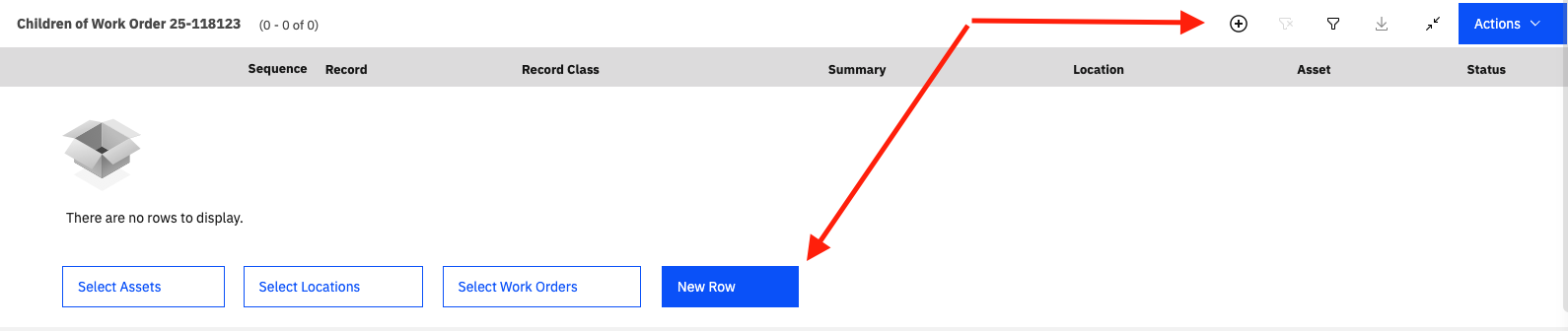
As with many things in Maximo, action buttons have been moved in MAS. As an example, within Manage, to add a ‘New Row’, there is now a + button above the table you are adding to by default. In 7.6, there was a button below the table that said, ‘New Row’. As with many other UI features I have covered in previous #TipTuesdays, there is a system property that you can use to control this.
Review the property mxe.webclient.tableButtonPlacement within your system. There are a few different options you can select from. Today in MAS, the default is 1. If you read the system property description, you can find out which values are available for displaying table buttons. Your options are 0=Display at bottom. 1=Display at top. 2=Display both.
In this screenshot, I have the setting set at 2 to show you both options:
Happy #TipTuesday! I hope this improves your experience with new rows in Manage.
#Administration
#Customizations
#EndUser
#MaximoApplicationSuite
#TipTuesday
-------------------------------------------
------------------------------
Allan Henle
Naviam
------------------------------