Maximo Open Forum

 View Only
  • 1.  #TipTuesday – Action Buttons have been Moved

    Posted 4 days ago
    Edited by Erin Pierce 4 days ago

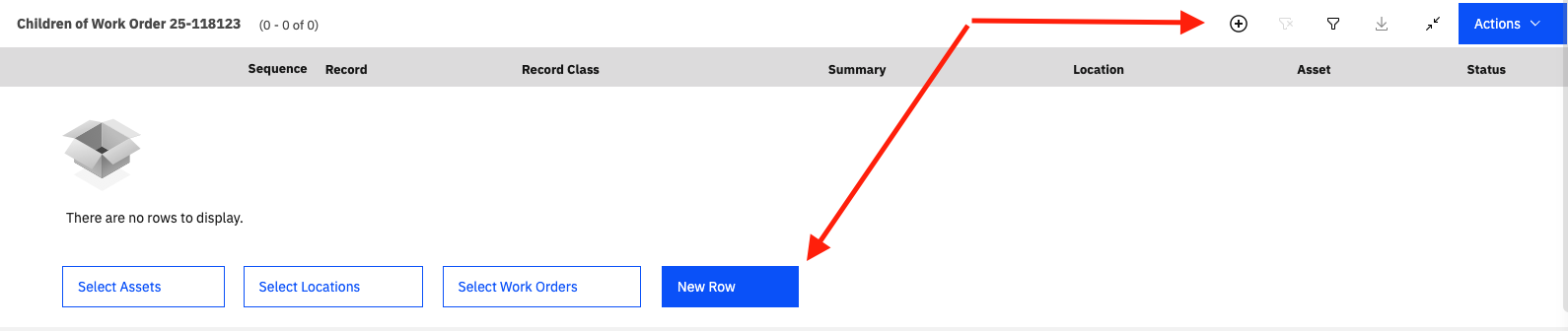
    As with many things in Maximo, action buttons have been moved in MAS. As an example, within Manage, to add a ‘New Row’, there is now a + button above the table you are adding to by default. In 7.6, there was a button below the table that said, ‘New Row’. As with many other UI features I have covered in previous #TipTuesdays, there is a system property that you can use to control this.

    Review the property mxe.webclient.tableButtonPlacement within your system. There are a few different options you can select from. Today in MAS, the default is 1. If you read the system property description, you can find out which values are available for displaying table buttons. Your options are 0=Display at bottom. 1=Display at top. 2=Display both.

    In this screenshot, I have the setting set at 2 to show you both options:
    A screen shot of a computer

AI-generated content may be incorrect.

    Happy #TipTuesday! I hope this improves your experience with new rows in Manage.


    #Administration
    #Customizations
    #EndUser
    #MaximoApplicationSuite
    #TipTuesday

    -------------------------------------------


    ------------------------------
    Allan Henle
    Naviam
    ------------------------------


  • 2.  RE: #TipTuesday – Action Buttons have been Moved

    Posted 2 days ago

    This is good to know! Are the next page action buttons (from list views) able to be moved from the bottom to the top in a similar way? Snip below.


    ------------------------------
    Kristina Strozzo
    Great Dane
    ------------------------------


  • 3.  RE: #TipTuesday – Action Buttons have been Moved

    Posted 2 days ago

    Hi Kristina,

    Unfortunately, there is no system property to move the 'next page' action from a table.

    Thank you,


    ------------------------------
    Allan Henle
    Naviam
    ------------------------------


  • 4.  RE: #TipTuesday – Action Buttons have been Moved

    Posted 2 days ago

    This is possible in MAS 9.1. A new system property (mxe.webclient.paginationButtonsPlacement) was added that can let you move to the top or both if you prefer (with the default staying the bottom like earlier versions of MAS)


    ------------------------------
    Steven Shull
    Naviam
    ------------------------------