Hi Maximo Open Forum,
When I first started learning my way around Maximo, I was overwhelmed by the number of fields on any given record (Assets, Work Orders, Service Requests, etc.).
I would hear things like, "Make sure the date field is checked," but there might be three different fields with the word date in them. Other times, developers or more experienced Maximo users refer to fields by the database column name, not what is shown in the Maximo UI.
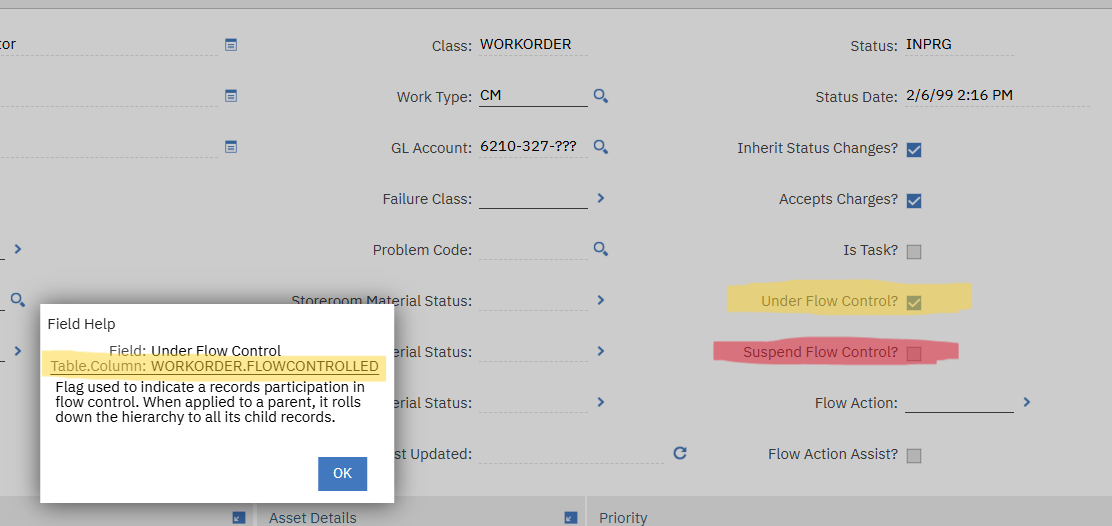
One trick I learned early on that I still use to this day is clicking on a field in Maximo, then pressing "Alt" and then "F1". This built in shortcut for Maximo reveals the actual database field behind the UI label. This field help window list the field name, column name, as well as a short description.
This shortcut is incredibly helpful when: troubleshooting data issues, building automation scripts, writing SQL queries, and more. Help out your newest Maximo user by making sure they know this shortcut right here. It will save a lot of confusion for that user, and save you time explaining what field is being referenced.
Do you use this shortcut? What are other Maximo shortcuts that are game changers for you and your team?
Happy #TipTuesday
#EndUser
#EverythingMaximo
#MaximoApplicationSuite
#MaximoUserGroups
#TipTuesday
------------------------------
Lucas Pletz
Naviam
------------------------------