It's a busy time of year with vacations all around, and kids getting out of school. I hope you are all enjoying your summer so far. Due to all the business and fun I missed posting yesterday, so here is another #TipTuesday on Wednesday!
You may have noticed that if you are logged into Manage and Admin Mode is going to begin, you get an email. This email lets you know that admin mode will be enabled soon, so save your work and log out. Did you know you can modify these messages?
If you navigate to the Database Configuration application and open the Messages from the More Actions options, it will show all messages in Manage. For this specific example, there are two messages you can update:
- BMXAA4036W can be used to control the email subject
- BMXAA4037W can be used to control the body of the email.
There are some fun ways you can update these with variable arguments. For example, in message BMXAA4037W, you can add 'System URL: :&HOSTNAME&'. This will pull the URL set in the mxe.hostname system property. IBM has many special bindings you play with.
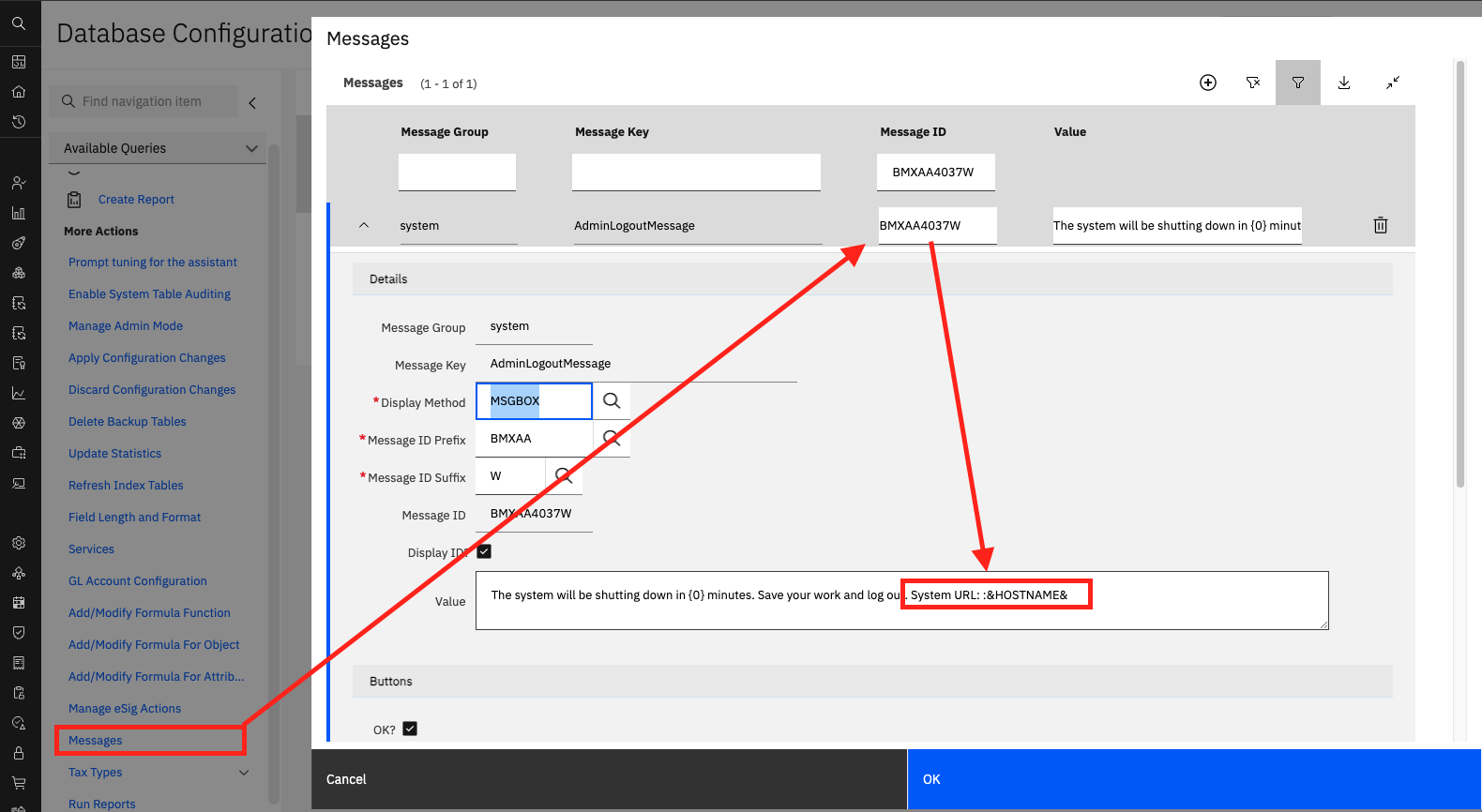
Please know that you can update any system messages as needed. You can use special binding to make the message more dynamic if that meets your needs or makes sense to you. You can also hard-code the information as you'd like.
Happy #TipTuesday,
#Administration
#EndUser
#EverythingMaximo
#MaximoApplicationSuite
#TipTuesday
------------------------------
Allan Henle
Naviam
------------------------------