Danny,
It's been a long time since I configured it, but in a quick glance at it it looks like it was very straightforward to add a recordimage element to the page, in both Item Master and Inventory. For example,

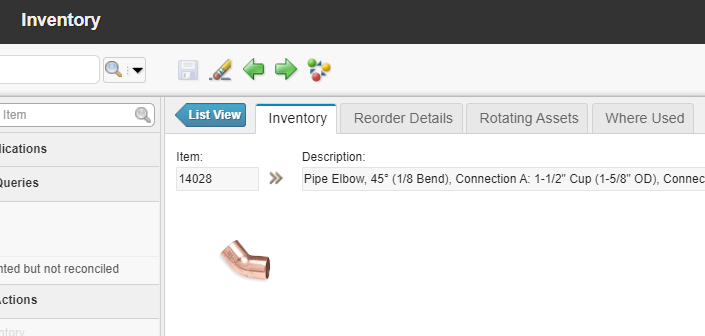
This is an excerpt from my INVENTOR.XML; just pay attention to the line with the recordimage:
<tab id="main" label="Inventory" type="insert">
    <section border="true" id="main_header">
        <section id="1468268943492">
            <sectionrow id="1468268951211">
                <sectioncol id="1468268962071">
                    <textbox dataattribute="ITEMNUM" id="1468268975086" inputmode="readonly" menutype="ITEM"/>
                </sectioncol>
                <sectioncol id="14682689512112">
                    <textbox dataattribute="ITEM.DESCRIPTION" id="1468268984274" inputmode="readonly" longdescreadonly="true" lookup="LONGDESC"
                        size="80"/>
                </sectioncol>
            </sectionrow>
        </section>
        <sectionrow id="main_header_row1">
            <sectioncol id="main_header_row1_col1">
                <section id="main_grid3">
                    <recordimage height="120" id="1468269238433" width="120"/>
                    <multiparttextbox applink="storeroom,ipc" dataattribute="location" descdataattribute="locations.description" descinputmode="readonly"
                          desclookup="longdesc" id="main_grid3_3" menutype="normal" title="Storeroom"/>
                    <textbox dataattribute="item.lottype" id="main_grid3_8" inputmode="readonly" title="Lot Type"/>
                    <textbox dataattribute="costtype" id="main_grid4_2b"/>
                    <textbox dataattribute="receipttolerance" id="main_grid4_2a"/>
                </section>
            </sectioncol>