Maximo Open Forum

 View Only

 Making Maximo 76 application read only for all the users as part of MAS 9.1 Go live

  • Administration
  • Customizations
  • Maximo User Groups
Mahadevan Ramakrishnan's profile image
Mahadevan Ramakrishnan posted 05-11-2026 03:05

Hi All,

We have a requirement to make Maximo 7.6 as read only for all users during the cut over for MAS 9 upgrade. 

There are a couple of ways to achieve this. One solution could be to create a READ_ONLY security group and assign all the users to this group and keep the READ option enabled along with enablement of basic options like running reports and viewing attachments. Since all the automated tasks will be brought down during the cutover like the cron tasks and async jobs, there is no way any update can happen to the existing Maximo 76 schema. We have used this approach successfully during events like yearly Inventory counting and reconciliation exercise and this worked well.


Second approach is to make objects read only by creating automation scrips and for that we have to identify all the objects used and carefully prepare the scripts.

If any of you have experience with this activity as part of MAS 9 go live, can you please share with me your experiences.

Thank you.

Steven Shull's profile image
Steven Shull

Especially because you've done option 1 in the past, I'd continue to go down that path. To me this situation isn't much different other than that if an update had been able to get through before, it would have remained in the database but would now be lost when you get to MAS. Most of our customers have limited read access to 7.6 to a subset of their users (IE made most users INACTIVE after the database backup was taken, put the remaining active users in a read-only group) to help limit the probability further. Some opt to take their 7.6 environment down entirely and wait until after the upgrade is complete as well. Just depends on the customer and how long they can operate without the system. 

Regardless of approach, there are ways updates can still occur such as if an automation script fires on initialize or an action and suppresses access check or someone developed a report with update capabilities. I always view this scenario as you're minimize the likelihood of a user accidentally making updates to the system and not necessarily trying to avoid it entirely.

It'd be nice if you could get Maximo to run with a read-only database account to completely protect yourself but there are tables (maxsession, serversession, taskscheduler,  etc.) that Maximo needs to be able to write to in order to startup. And certain tables like reportrunqueue that needs to be written to when actions are performed. Perhaps with enough time you could identify the minimal set required to get it to operate to protect it even further. Not something I've tried but would be interesting what it would take. 

Chris Brown's profile image
Chris Brown

Hello,

I've never used this during an actual cutover before so this may not be perfect for every situation and you may find there are additional grants you want or need, but I just ran through this myself as, like Steven, I was curious what the minimum level of database access the Maximo DB user would need in order to start the system, log in, and view data successfully.

A few notes from my testing, I disabled all Cron Tasks before testing and I tested this in a MAS Manage environment rather than a Maximo 7.6 environment, simply because it was what I had available. That being said though from an application perspective, Manage and Maximo 7.6 are functionally very close, so I would expect the same approach to work in 7.6 as well.

I did this using DB2 but aside from the syntax this should work on Oracle and SQL Server too.

--Ensure the role is clean of other permissions by dropping it and re-creating it.
DROP ROLE MAXIMORO_ROLE;
CREATE ROLE MAXIMORO_ROLE;

--Read access to full Maximo Schema.
GRANT SELECTIN ON SCHEMA MAXIMO TO ROLE MAXIMORO_ROLE;

--Minimum write access required to actually login
GRANT INSERT, UPDATE, DELETE ON TABLE MAXIMO.MAXSESSION TO ROLE MAXIMORO_ROLE;
GRANT INSERT, UPDATE, DELETE ON TABLE MAXIMO.SERVERSESSION TO ROLE MAXIMORO_ROLE;
GRANT INSERT, UPDATE, DELETE ON TABLE MAXIMO.LOGINTRACKING TO ROLE MAXIMORO_ROLE;
GRANT INSERT, UPDATE, DELETE ON TABLE MAXIMO.MAXRECORDLOCK TO ROLE MAXIMORO_ROLE;

--Sequences needed for creating server / user sessions etc.
GRANT USAGE ON SEQUENCE MAXIMO.MAXSESSIONSEQ TO ROLE MAXIMORO_ROLE;
GRANT USAGE ON SEQUENCE MAXIMO.SERVERSESSIONSEQ TO ROLE MAXIMORO_ROLE;
GRANT USAGE ON SEQUENCE MAXIMO.LOGINTRACKINGUSEQ TO ROLE MAXIMORO_ROLE;
GRANT USAGE ON SEQUENCE MAXIMO.LOGINTRACKINGSEQ TO ROLE MAXIMORO_ROLE;
GRANT USAGE ON SEQUENCE MAXIMO.MAXRECORDLOCKSEQ TO ROLE MAXIMORO_ROLE;

--Grant the role to the read only user
GRANT ROLE MAXIMORO_ROLE TO USER MAXIMORO;

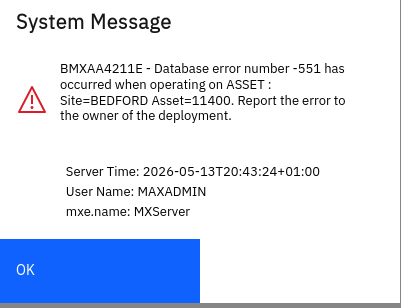
The above lets me log in successfully and when i go to a record I can open it like normal (tested several Assets, Work Orders, Locations etc) and if I try and update it as we expect I get the following error
I do get errors in the logs where Maximo is trying to write to other tables and I could grant this access too but I think for what you are trying to achieve it's not needed.

For info though the tables I see go by in the logs Maximo is wanting write too are

  • BIMSESSION
  • REORDERMUTEX
  • REPORTJOB
  • SCCONFIG