Hi @Acey Nguyen"
Maximo has properties tu define where attachments are saved.
mxe.doclink.doctypes.topLevelPaths
Here you will see a path stored where the attachments are saved. So, copy and paste it into a browser or file explorer and see if it responds.
You can try, in your case, removing the jpg from the reference... that is, 192.168.18.176/ATTACHEMENTS/
The domain user "maximo" (application owner) writes the attachments to that path. If someone removed this user's permission to write there, an error like the one you have appears. I'm not saying that's the problem, but it's possible.
Regards!
------------------------------
Martin Fabra
ARSAT S.A. - Actively seeking employment
------------------------------
Original Message:
Sent: 05-13-2024 23:54
From: Acey Nguyen
Subject: Error when viewing attachment
Today, I have tested view attachment function again and I got an error as below:
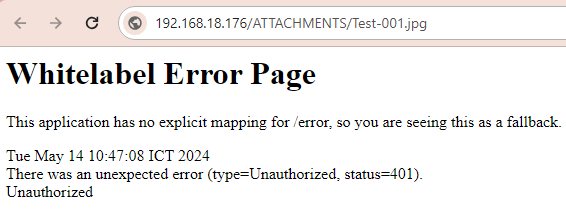
Can anyone help? Thanks.
------------------------------
[Acey] [Nguyen]
[NGS]
------------------------------