A few weeks ago, Lucas covered a way to help identify any field in Maximo. If you missed it, I will cover it here, but you can also go check out his blog here: 1. #TipTuesday: Instantly Identify Any Field in Maximo (Alt + F1). If you have upgraded to MAS, there is a new way to open the Internal Field Help Dialog on a record. As discussed by Lucas in 7.6, you can use ALT+F1 (this was my preferred method) or ALT+I. Both of those still work in MAS today but might not be the best or fastest.
In MAS, you can now open this dialog in a new way. Simply double-click the field title to open the Internal Field Help. You may have already found this by accident, like I did, when trying to click into a field. Now in MAS, I use it almost daily to support our clients. It tends to be much quicker for me than taking my hands off the mouse to use a keyboard shortcut.
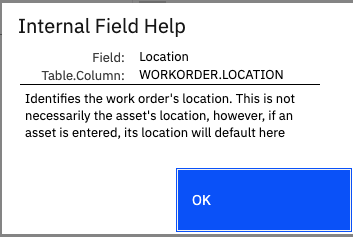
I hope this can help streamline how you work in MAS. Happy #TipTuesday!
Thank you,
#Administration
#EndUser
#EverythingMaximo
#MaximoApplicationSuite
#WorkManagement
#TipTuesday
------------------------------
Allan Henle
Naviam
------------------------------