Maximo Open Forum

 View Only
  • 1.  Invalid fields in Application Designer

    Posted 8 days ago

    Hi everyone,

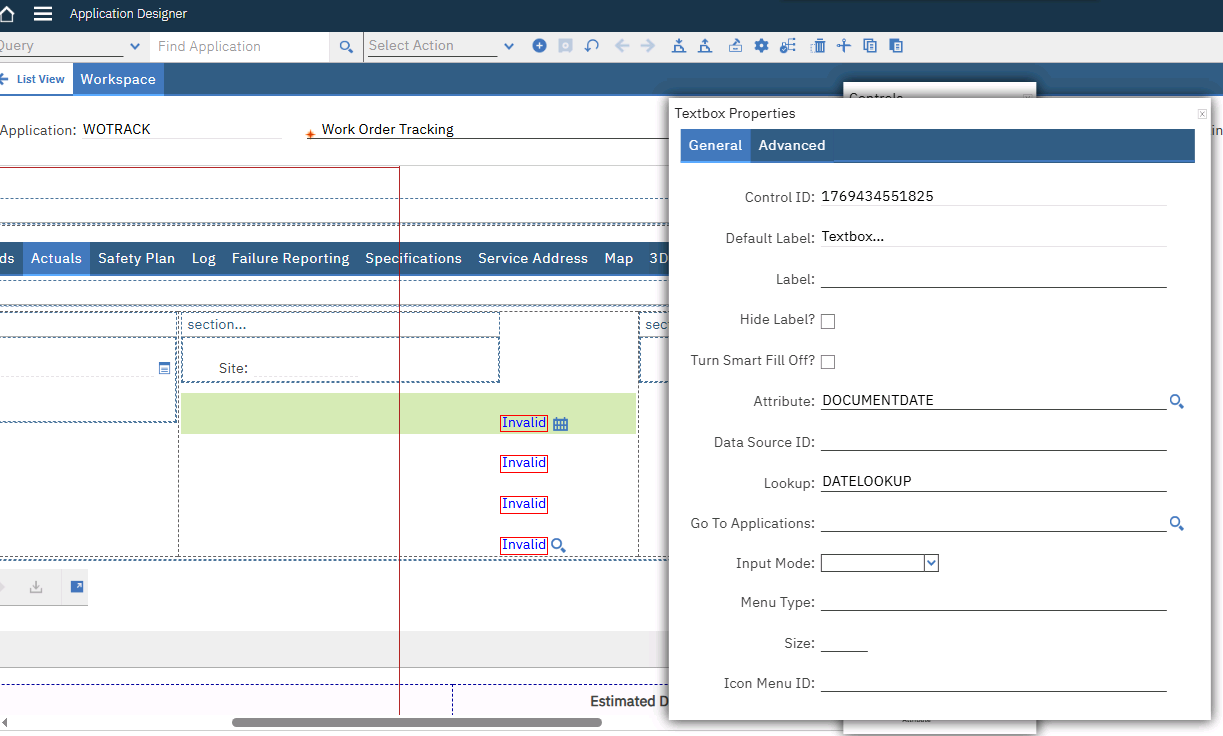
    I've added new attributes in Database Configuration and applied the configuration successfully. I then added the fields in Application Designer and configured the textbox properties correctly.

    Everything appears correct both in DBConfig and in the UI, however the fields still show as Invalid when entering data or on save. There are no visible validation errors, no obvious scripts or conditions affecting the field, and other similar attributes work fine.

    Has anyone experienced a case where a field appears invalid even though Database Configuration and Application Designer settings are correct?

    Thanks in advance!


    #Administration
    #Customizations
    #EverythingMaximo
    #Utilities
    #WorkManagement

    ------------------------------
    Raziela Avdylaj
    InfoSoft Business Solutions
    ------------------------------


  • 2.  RE: Invalid fields in Application Designer

    Posted 8 days ago
    Hi Raziela,
    This sounds like a binding issue between your Application Designer control and the attribute. When you see fields marked as "invalid" without any actual validation errors, it's usually because the control isn't properly associated with the attribute in the data dictionary.

    First thing to check: Open Application Designer, select the problematic field on the canvas, and look at its properties. Make sure the Attribute property is actually set to your new attribute name. Sometimes when you drag a textbox onto the screen, it doesn't automatically bind to anything, or the binding gets lost. You might need to manually search for and select your attribute from the lookup. If you have a similar attributename in other objects, check you're selecting the correct object.

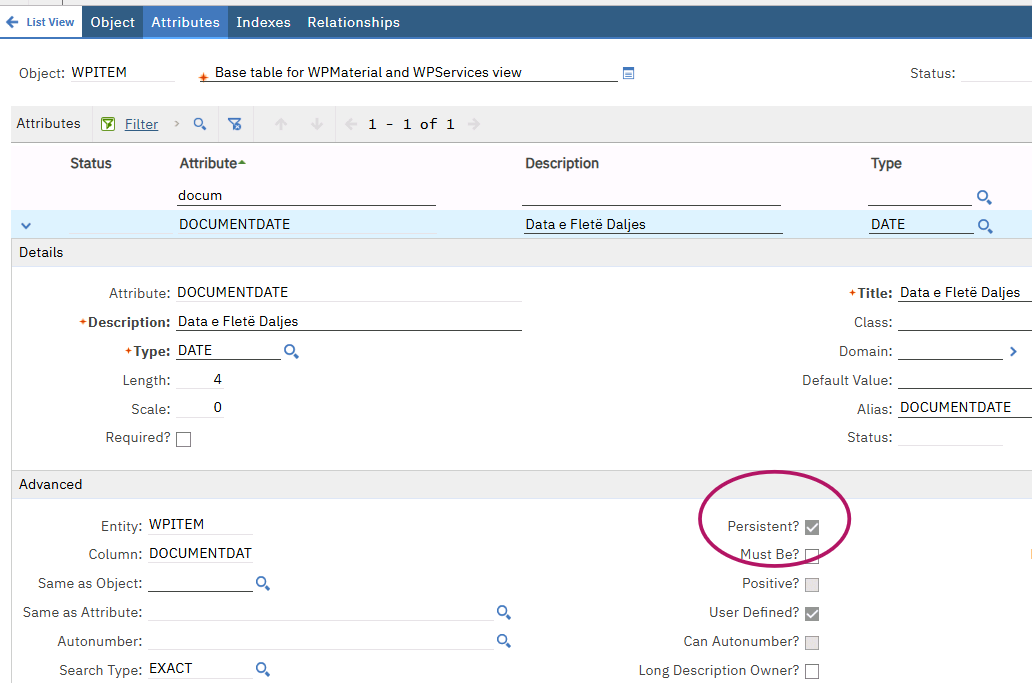
    Another thing that catches people - check if your new attributes have the Persistent flag set correctly in Database Configuration. Non-persistent fields require different handling and can show as invalid if you're trying to save data to them directly.

    If none of that works, check the Maximo logs when you try to open/save. There's usually more detail there about what's actually failing, and share the logs with us if you need more help.


    ------------------------------
    Maycon Belfort
    Naviam
    IBM Champion 2025
    ------------------------------


  • 3.  RE: Invalid fields in Application Designer

    Posted 8 days ago

    Hi Raziela

    From your description, you have added a new field to an object, then added the new field to an application UI.  So, my most basic question is, what is the status of the object and field?  Even though you said you had done the configuration, is the status field blank?

    Now, let's assume that it is. What other reason could the field then have a binding issue?  Typically, the object that is underlying the section that you're adding the field to knows nothing about the attribute because the attribute has not been configured, or you're adding to a section that is using a relationship and thus is on an entirely different object.

    How do you know that the UI bit has been configured correctly?  Where is the attribute being placed?

    BTW, from my perspective, whenever someone says "configured correctly" and does not post any pics, it's very hard for us to evaluate if that holds true.  Can I ask everyone that where possible to post the some pics.  We like, support, are not mind readers.


    ------------------------------
    Craig Kokay
    Principal Consultant
    COSOL

    email: craig.kokay@cosol.global
    #IBMChampion
    ------------------------------


  • 4.  RE: Invalid fields in Application Designer

    Posted 7 days ago

    Hi Raziela!

    If the field is there in DB configuration, and you have it linked to the attribute in Application Designer (no misspellings), then the 'invalid binding' could very well be related to an incorrect data source or a bean class.  Does this field appear on the "main record" or is it w/in a child table or dialog box?


    ------------------------------
    Jade Warren
    Great River Energy
    ------------------------------


  • 5.  RE: Invalid fields in Application Designer

    Posted 4 days ago

    Thanks all for the feedback.

    To clarify the situation in more detail:

    • the attributes are correctly created in Database Configuration
    • configuration has been applied, and the object and attribute names match exactly
    • all attributes involved are persistent

    In Application Designer, the controls are bound directly to the attributes via the Attribute property (selected from the lookup, not typed), and the section does not use any relationship - it is based on the main object/datasource.

    The controls were added normally via properties (not copied), and required/readonly/domain settings have been double-checked.

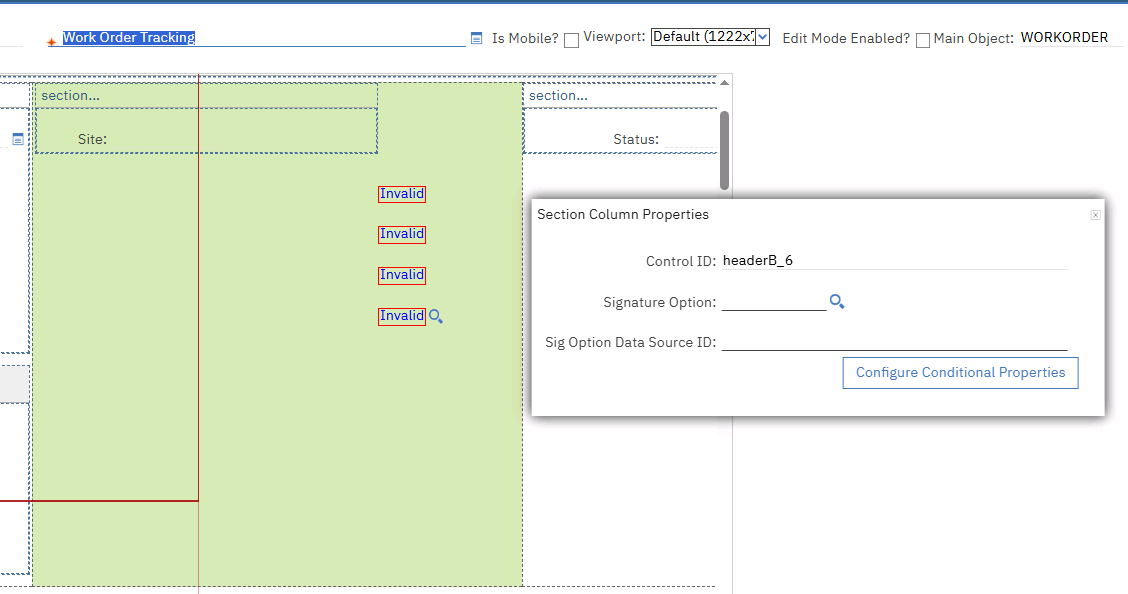
    Despite this, the fields still show as invalid with no explicit validation error. At this point, honestly, I'm out of ideas as to what else could be causing this. I'm attaching screenshots so you can see the exact setup, because from my side everything looks correct and I can't identify what Maximo is unhappy about.

    Thanks for the insights!


    ------------------------------
    Raziela Avdylaj
    InfoSoft Business Solutions
    ------------------------------


  • 6.  RE: Invalid fields in Application Designer

    Posted 4 days ago

    Hi Raziela!

    Thank you for the screenshots.  If the attributes have been added on WPITEM, then they would not be associated w/the 'mainrecord' data source, as WPITEM is always a child object to WORKORDER.  I would suggest putting a SECTION in the SECTIONCOL control, dropping the attributes in questions into the SECTION, and then specifying the data source of the SECTION to match either the materials / services / tools on the Actuals tab.  This may work by specifying data source = actuals_actuals_acmaterials_acmaterials_table, or instead adding a data source with the correct relationship / bean class combo for the target actuals table :o)


    ------------------------------
    Jade Warren
    Great River Energy
    ------------------------------


  • 7.  RE: Invalid fields in Application Designer

    Posted 4 days ago

    Hi Raziela

    Thanks for the picture, as that gave an insight into what is wrong. 

    If you notice, the label has not been pulled through.  This is because the field does not exist on the object that is resident on that part of the screen to which you added the field.  In fact, that section belongs to the WORKORDER, yet you added the new field to the WPITEM object.  You would either have to reference the field using a relationship, i.e. WPITEM.DOCUMENTDATE or add a new section and assign the relationship to that then all the fields you add to that section belong to the "child" object and simply use DOCUMENTDATE as the attribute name.

    However, this will not work as there could be many WPITEM lines, and the type of relationship I'm expressing is a 1:1.

    Additionally, the tab where you have indicated that you want to place the new field on has nothing to do with WPITEM.  WPITEM is about the Plan tab, not Actuals.  For items actually used, you would be looking at the MATUSETRANS object.

    You then need to add the field to the Actuals | Materials table.  Similar to what Jade has said, do this:

    1. Add the new field to the detail section of the table
      1. Copy the Control ID
    2. Add a new table column
      1. Link it to the new attribute
      2. Assign the Control ID from step 1 to the Linked Controls ID
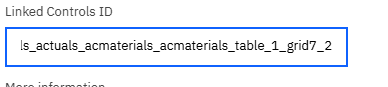
      3. Save

    The implementation of what you have now shown us is that for each row in the WPITEM table, you want to collect the Documentation Date.


    ------------------------------
    Craig Kokay
    Principal Consultant
    COSOL

    email: craig.kokay@cosol.global
    #IBMChampion
    ------------------------------


  • 8.  RE: Invalid fields in Application Designer

    Posted 21 hours ago

    Hi Jade and Craig,

    Thanks a lot to both of you for the detailed explanations - they were extremely helpful and pointed me in the right direction.

    Just to clarify what I was actually trying to do: these fields were meant to be displayed on the Plans tab, but not to be collected on a strict row-by-row (1:1) basis for each material line in the Plans materials table. The confusion came from the fact that the attributes were created on WPITEM, while the section where I initially placed the fields was effectively bound to WORKORDER (as requested by our client). As you correctly pointed out, in that case the object owning the section does not "see" the WPITEM attributes, which explains why Maximo kept marking them as invalid.

    Once I referenced the attribute using the object name WPITEM.DOCUMENTDATE, the field validated correctly and the "invalid" state was resolved. 

    So yeah - lesson learned thanks to you both. This was super useful to understand and I'll definitely keep it in mind for future cases.

    Thanks again!


    ------------------------------
    Raziela Avdylaj
    InfoSoft Business Solutions
    ------------------------------