Maximo Open Forum

 View Only

 Customizing the list shown in a "Select Value" dialog

Jump to  Best Answer
  • Customizations
  • Maximo Application Suite
Brian Bulla's profile image
Brian Bulla posted 05-28-2026 08:16

Hi,

I'm trying to automatically filter down a list displayed to the users when they create a new Communication on a Work Order.  I am trying this with an Automation Script, but no luck yet.  Here is what I am doing:

1.      Go to Work Order Tracking (Tr) application

2.      Under Actions, select Create – Communication

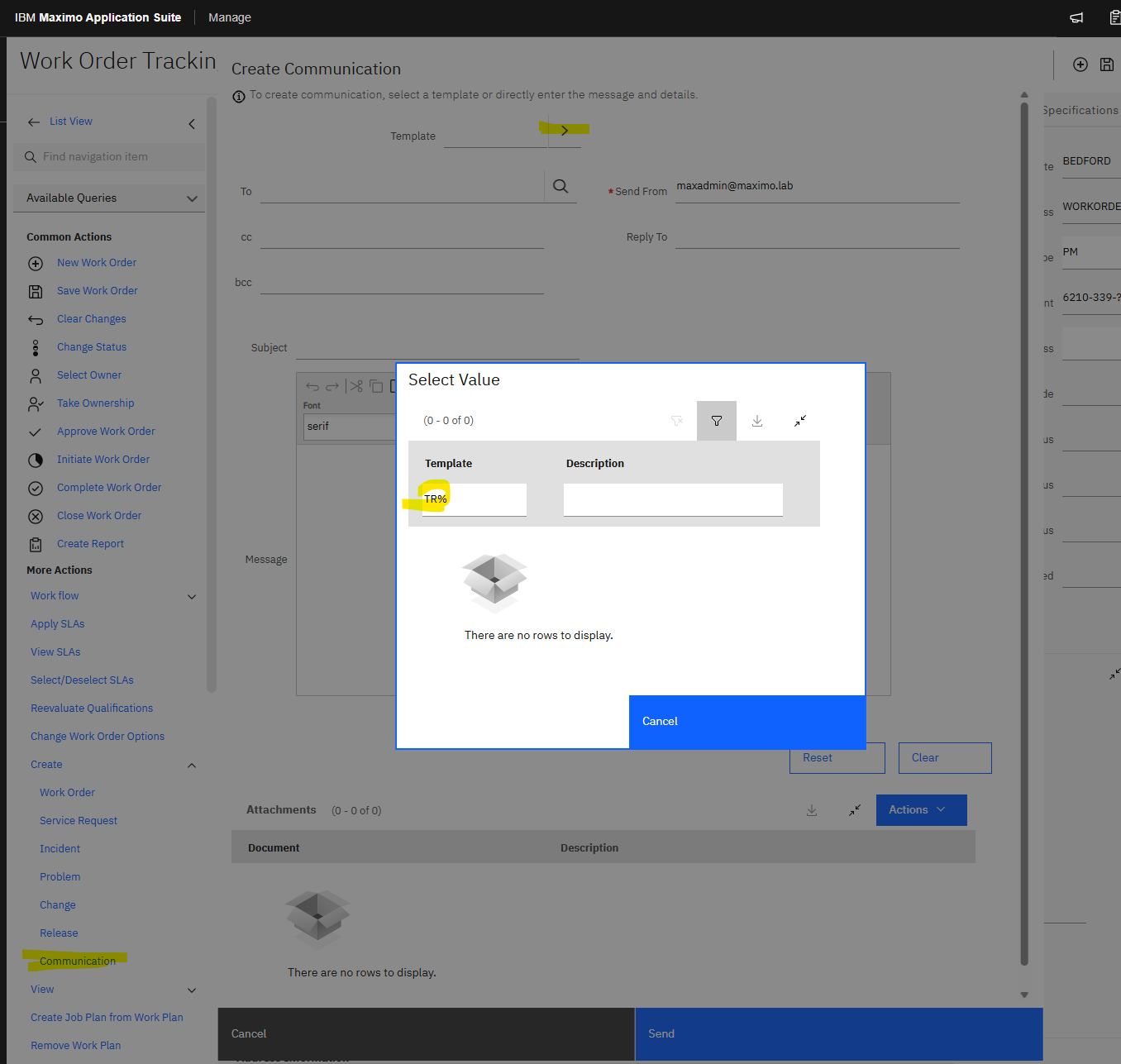
3.      On the Create Communication dialog, click on the chevron beside “Template” and choose “Select Value”

4.      Here we need to filter the list to only show Templates for “Transit” users.  (ie. LIKE “TR-%”)


A screenshot of a computer

AI-generated content may be incorrect.

Initially the list shown has about 34 Templates to choose from, but the users needs to type “TR-“ in the filter to see only what is applicable for them.  I would like to implement an automation script to filter this list.  Is this possible?

So far I have tried creating one on the INIT event of the COMMTEMPLATE object with the following:

To only run the script for “TRANSIT” users I use an Object Event Condition = :&PERSONID& IN (SELECT personid FROM person WHERE cgdivision = 'TRANSIT')

The script to filter the list:

mboSet = mbo.getThisMboSet()
mboSet.setWhere("templateid LIKE 'TR-%'")
mboSet.reset()

But when I activate this automation, all I get is a blank list.  Can anybody see where I am going wrong here??

If I run the following SQL against my database, I get the results I am looking for:

A screenshot of a computer

AI-generated content may be incorrect.

Thanks,

Brian Bulla's profile image
Brian Bulla  Best Answer

Hi Christi and Isak,

Thanks for responding.  I actually found an Out of the Box way to do this, where no coding was required.  This may not work for all cases, but in this instance it does work since all of the affected users are in a common security group.

Filter the Communication Template list so that only those applicable to Transit show, for only Transit users.

1.      Create Condition

a.      Go to Conditional Expression Manager

b.      Add a new condition:

                                                              i.      Condition:  TRCOMMTEMPL – Show only Transit Communication Templates

                                                             ii.      Type:  EXPRESSION

                                                           iii.      Expression:  templateid LIKE 'TR-%' and templateid not like '%-REQ'

A screenshot of a computer

AI-generated content may be incorrect.

2.      Create Security Restriction:

a.      Go to Security Groups application

b.      Select the “SITETRANSIT” security group

c.      Go to “Data Restriction – Object Resrictions”

d.      Add new Object Restriction

                                                              i.      Object:  COMMTEMPLATE

                                                             ii.      Application:  PLUSTWO

                                                           iii.      Type:  QUALIFIED

                                                           iv.      Condition:  TRCOMMTEMPL

A screenshot of a computer

AI-generated content may be incorrect.

Christi Eades's profile image
Christi Eades

Brian,

If you want to ALWAYS filter the Lookup for communication templates, instead of using an automation script you could just add a whereclause to the lookup in the XML.  Below is an example of how we are using the whereclause to filter the list based on the person's commoditygroup, but you could also just do something simple like whereclause="templateid like 'TR-%"

You can find this table in the LOOKUP System XML:

Isak Söderback's profile image
Isak Söderback

I guess this is still unsolved since, as I understand, you are looking for a dynamic way to pre-filter the value list but with the possibility to "restore" the original where clause if preferred.

Instead of init my approach would be to create a script on the Retrieve list-event for object COMMLOG and attribute TEMPLATEID. My script will then be executed when using lookup for this specific field or getlist-event through rest api etc. Therefore it's important to make sure that you always return a value from this type of script since Maximo will expect your script to take fully responsibility for this when activated. 

My script written in jython:

from psdi.mbo import TranslateCacheFactory

translate = TranslateCacheFactory.getInstance().getCache()
owner=mbo.getOwner().getName()
whereclause="objectname='" + owner + "' and status in (" + translate.toExternalList("COMMTMPLTSTATUS", "ACTIVE") + ") and ((usewith in (" + translate.toExternalList("TEMPLATEUSEWITH", "APPS") + ")) or (usewith in (" + translate.toExternalList("TEMPLATEUSEWITH", "ALL") + ")))"
commList = mbo.getMboSet("tempcom","COMMTEMPLATE",whereclause)
wcs = service.webclientsession()
if wcs:
    if wcs.getCurrentApp().getId().lower() == "wotrack":
        pid=mbo.getUserInfo().getPersonId()
        if not mbo.getMboSet("tempperson","PERSON","personid='"+pid+"' and droppoint = 'TRANSIT'").isEmpty():
            commList.setQbe("TEMPLATEID","TR%")
listMboSet=commList

In action giving you,
What it does:

  1. Includes TranslateCacheFactory and are able to use toExternalList method 
  2. State base where clause based on how Maximo originally limits templates available - making sure to only present those related to actual object or general (ALL)
  3. Prepare the mboSet with this where clause and set the "base"
  4. Make sure webclientsession is available before use, could be null when triggered from integration 
  5. If in right context (wotrack in my example) then check person setup
  6. If cgdivision, then setQBe to TR%

Hopefully this gives you a good starting point. Since I don't have the exact prerequisites you may need to change some things. Such as the reference to the app id and cgdivision.

To really be on the safe side an outer check to make sure variable owner is available (gets an value) could be added, and if not where clause for "commList" could be 1=1. This way you make sure that there's always data being returned. Good luck!